Hotels
Refresh Hotel Room Photos in 24–48 Hours With Honest AI, for Managers
Enhance existing hotel room photos quickly and affordably with AI, boosting booking appeal and online visibility without costly, time-consuming reshoots.
By Hospitality Lens · · 14 min read
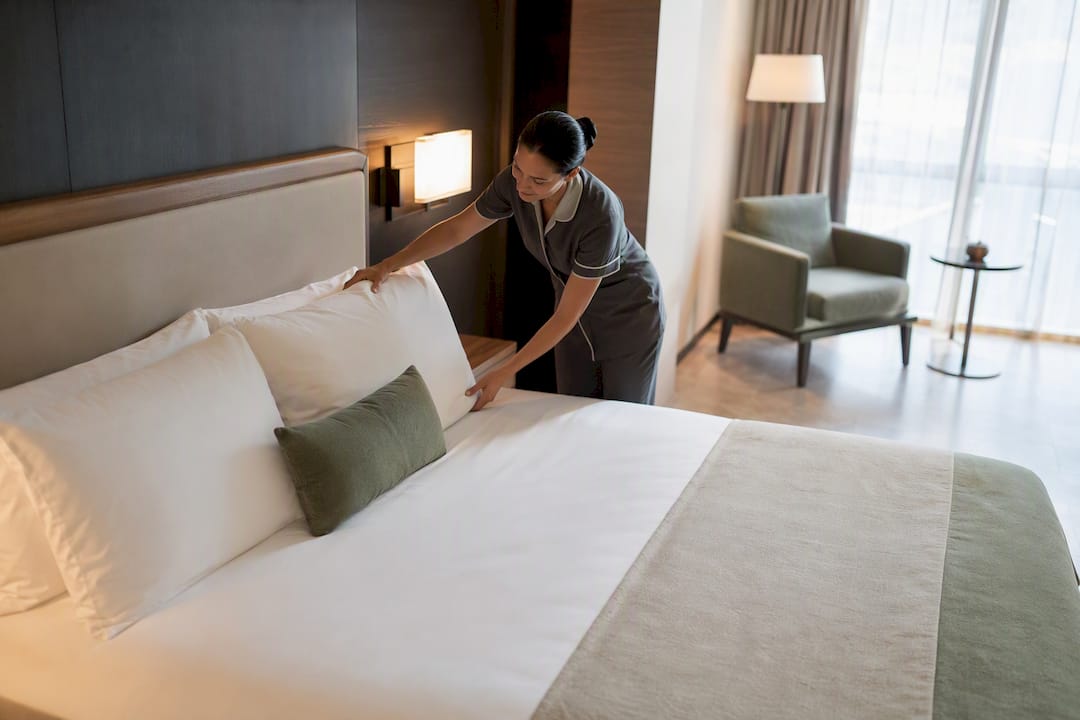
For most hotel room photo updates driven by cosmetic renovations or seasonal refreshes, enhancing existing images is faster and cheaper than a reshoot. Reserve a full reshoot for structural changes, layout shifts, or flagship property launches. Booking-platform search and ranking systems use multiple signals that can change over time. Treat image quality as one part of listing quality and rely on current first-party guidance rather than a guaranteed ranking effect.
TL;DR:
- Enhancing photos is ideal for cosmetic updates like paint, linens, or lighting, while reshoots are necessary for structural or layout changes.
- Booking-platform search and ranking systems use multiple signals that can change over time. Treat image quality as one part of listing quality and rely on current first-party guidance rather than a guaranteed ranking effect.
- Professional reshoots for renovations typically cost between $5,000 and $15,000 and take weeks, whereas AI-based enhancement costs around 5% to 10% of that and takes hours to days.
- Use a consistent three-day process for batch editing, starting with selecting hero images on Day 1, batch processing on Day 2, and updating amenities on Day 3, with quality checks before going live.
- Always stage rooms for a photo shoot by removing clutter and maximizing natural light to ensure the final images genuinely reflect the space and meet platform standards.
HospitalityLens
Refresh Your Room Photos Without Reshooting
Turn usable hotel room photos into realistic, booking-ready listing images with truthful enhancement that preserves the real property.
Try one photo freeTable of Contents
How Do You Update Hotel Room Photos Fast?
Most operators can get refreshed images live within a day or two if they work through the process in order rather than trying to fix everything at once.
- Pick your hero images first. Choose one representative photo per room category and one for the exterior. These carry the most weight in search results and OTA thumbnails.
- Decide enhancement or reshoot. Cosmetic changes (new paint, fabric, flooring) call for enhancement. Structural changes (moved walls, new windows, renovated bathrooms) call for a reshoot.
- Test one photo free. Run a single image through a watermarked preview to confirm the enhancement looks accurate before committing to a full batch.
- Deploy hero images first. Update your OTA thumbnails and website hero images before touching the rest of the gallery. This is where guests make their first decision.
- Record your baseline. Booking-platform search and ranking systems use multiple signals that can change over time. Treat image quality as one part of listing quality and rely on current first-party guidance rather than a guaranteed ranking effect.
- Schedule the full rollout. Plan the remaining gallery images and set a recurring refresh cadence, typically annual, so this doesn’t become a one-time fix.
Should You Reshoot or Just Enhance the Photos?
The decision comes down to one question: did the physical room change in a way a photo edit cannot represent honestly? If the answer is no, enhancement almost always wins on cost and speed.
- Enhancement fits: new paint color, updated linens or fabric, replaced flooring, minor decor swaps, correcting a photo that was simply shot poorly (dark, crooked, cluttered).
- Reshoot fits: moved or added windows, reconfigured bathroom layout, structural additions, new room categories entirely, or a flagship property launch where first impressions carry outsized weight.
- Cost and timeline gap: a professional reshoot after renovation commonly runs $5,000 to $15,000 for a typical property and takes weeks to schedule and deliver. AI editing for cosmetic renovations can land at roughly 5% to 10% of that cost, with turnaround measured in hours to days rather than weeks.
- Authenticity is not optional. Enhancement should correct lighting, color, and perspective, not invent a view, a pool, or an amenity that doesn’t exist. Guests who arrive to a room that doesn’t match the listing photo leave the kind of review that costs far more than a photo update ever saves.
A photographer is still the right call for a flagship property’s debut, true architectural photography, drone or complex exterior work, or any situation where the existing photos are simply unusable as a starting point. Our reshoot decision guide walks through the edge cases in more detail.
What’s a Realistic Timeline for a Photo Update?
A hotel room photo update doesn’t need to consume a week of staff time. Here’s a three-day plan that gets a meaningful refresh live without disrupting operations.
- Day 1: Hero images. Select one representative photo per room category and process it first, using consistent lighting and color settings. This becomes your template for everything that follows.
- Day 2: Batch the rest. Process remaining room-category images using the same settings established on Day 1. Batch-processing with consistent enhancement settings across a room category preserves portfolio consistency and cuts down the time you’d otherwise spend eyeballing each image for consistency. Check white balance and horizon lines across the batch before moving on.
- Day 3: Amenities and extras. Update common areas and amenity shots, then pull together before-and-after comparisons for social posts or a press note about the refresh.
Before anything goes live, run a short QA pass: does each image accurately represent the room, are there no invented features or amenities, is white balance consistent across the set, and does each thumbnail still read clearly at small sizes on a phone screen?
Pro Tip: Check your new hero images at actual OTA thumbnail size, not full resolution on your desktop monitor. A photo that looks sharp full screen can turn muddy or overly dark once it’s shrunk to a 200 pixel thumbnail on a booking site.
What Are the Technical Specs for Listing Photos?
Google recommends a minimum resolution of 1024×683 pixels, with 2048×1366 pixels as the preferred target on the long side. Landscape orientation performs best across OTAs and booking engines. Accepted formats are JPG, JPEG, WEBP, and PNG, and it’s worth compressing final files to roughly under 400 KB where possible so pages load quickly without visible quality loss.
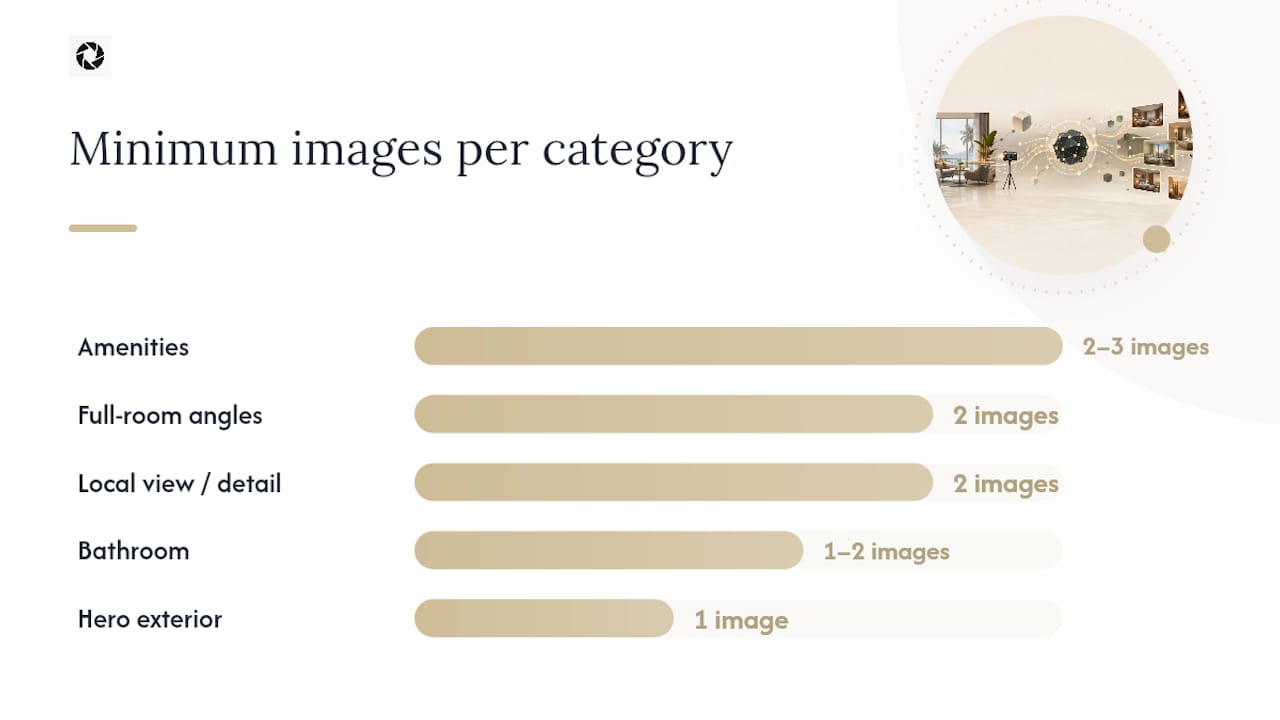
On coverage, a “13-photo floor” is the minimal complete set that tends to lift conversion: hero exterior, primary full-room angle, a secondary room angle, a bed-front shot, bathroom, a human-context image, amenities, a local view, and detail shots rounding out the set.
| Shot category |
Minimum images |
Notes |
| Hero exterior |
1 |
First impression; update after any facade or landscaping change |
| Full-room angles |
2 |
Wide shot plus a secondary angle for depth |
| Bed-front / focal point |
1 |
The shot most guests screenshot |
| Bathroom |
1–2 |
Add a second if recently renovated |
| Human-context |
1 |
A hand on a coffee cup or feet on a balcony rail convert better than empty rooms, according to Hotel Tech Insight’s photography research |
| Amenities |
2–3 |
Pool, gym, lobby, or whatever differentiates the property |
| Local view / detail |
2 |
Neighborhood context and a signature design detail |
Add two extra images per distinct room type once you exceed a single standard category; consider exploring top recurring entertainment options for hotel lobbies to enrich your common area images and enhance guest experience visuals. After uploading, give OTAs 24 to 72 hours to propagate new thumbnails before judging whether the update worked. Our image standards guide covers platform-specific quirks in more depth.
How Do You Brief a Photo Enhancement Service?
A clear brief is what separates a useful enhancement from a wasted revision cycle. Give the editor or service:
- One representative high-resolution photo per room type, not a folder of near-duplicates.
- Brand color hex codes only if a repaint or rebrand is part of the update.
- A short, explicit list of what’s off-limits: no invented views, no added amenities, no misleading staging.
The allowed edits are lighting and color correction, perspective and horizon correction, clutter cleanup, and person or object removal, all while preserving the real room. Authenticity matters more than ever, as AI-edited property photos have drawn scrutiny when the final image no longer matches what a guest actually finds at check-in.
Free watermarked preview. Pay only if you like it. No card is required to create the free watermarked preview. See current pricing for unlocks, one-time packs, and subscriptions.
How Do You Measure Whether the Update Worked?
Booking-engine conversion is your primary KPI, but it only means something against a real baseline. Record conversion for the two to four weeks before your update, then compare it against a 60 to 90 day post-update window, since that’s roughly how long it takes for the change to fully show up in the data.
- Booking-platform search and ranking systems use multiple signals that can change over time. Treat image quality as one part of listing quality and rely on current first-party guidance rather than a guaranteed ranking effect.
- Track listing rank shifts on the platforms where rank responds to engagement.
- Compare impressions-to-click ratio before and after, not just raw click volume.
If the numbers move in the right direction, scale the same settings across the rest of your portfolio and keep the batch-processing approach consistent. If results are flat or negative, don’t panic and reshoot everything. Check the edits for accuracy issues first, consider reverting the hero image, and only schedule a full reshoot if the QA review turns up a real mismatch between photo and property. As a baseline, plan to refresh your gallery at least once a year, and immediately after any renovation, amenity addition, or meaningful seasonal change. Our piece on what makes hotel photos convert breaks down the conversion metrics in more depth.
What Should You Do Before the Camera Comes Out?
A room can be well-designed and still photograph badly if it isn’t staged for a lens rather than for a guest walking in. The two experiences are not the same, and treating them the same is the most common reason photo updates underperform.
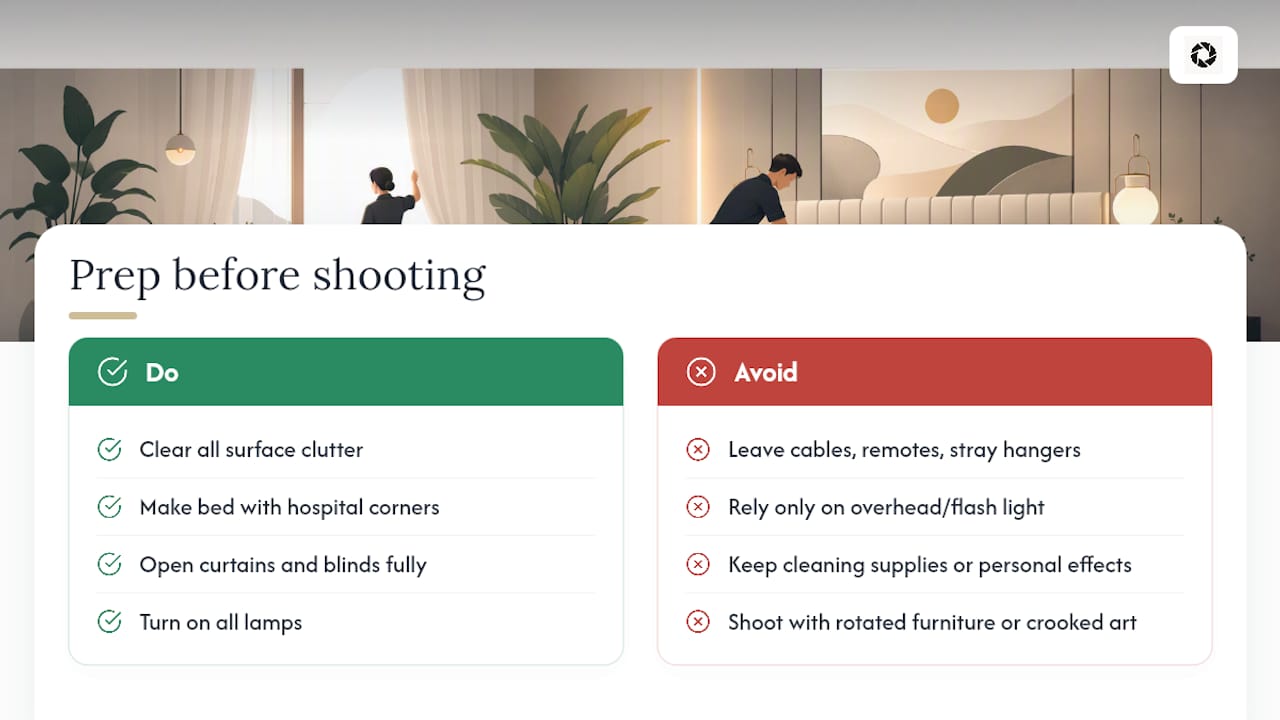
Clear every surface of clutter that reads fine in person but distracts in a still frame: cables, remote controls, extra toiletries, stray hangers. Make the bed with hospital corners and fluff pillows so the focal point of the room reads clean at a glance. Open curtains and blinds fully to maximize natural light, since window light at roughly a 45 degree angle tends to flatter a room far more than overhead fixtures or flash. Turn on all lamps regardless of whether daylight is sufficient. It fills shadows the eye won’t notice live but a camera will.
Remove personal items, cleaning supplies, and anything branded to a previous season if you’re shooting for a general listing. Add one or two intentional touches. A folded robe, a set coffee tray, an open book. These read as lived-in without reading as messy. Straighten artwork and check that furniture lines are square to the walls, since a slightly rotated chair is barely noticeable in person but obvious in a photo.
If you’re using enhancement rather than a reshoot, staging still matters. A well-staged room needs less correction and the final enhanced image looks more convincing, because you’re not asking software to compensate for clutter or bad light that a few minutes of prep would have solved.
How Do You Choose a Photographer for a Hotel Shoot?
When a reshoot is genuinely the right call, the photographer you hire matters as much as the decision to shoot at all. Look for someone with a hospitality-specific portfolio, not just a generalist real estate shooter. Hotel rooms have their own lighting challenges, tight bathrooms, and awkward corners that a photographer used to shooting single-family homes may not have solved before.
Ask to see full galleries from past hotel work, not just curated highlight shots. A gallery shows you whether they can deliver consistent quality across dozens of rooms, which is the real test for a multi-room property. Confirm turnaround time in the contract, since a shoot that takes two weeks to deliver defeats the purpose of a fast update.
Clarify usage rights up front. Some photographers license images for a limited term or specific platforms, which can create problems later if you want to reuse images across OTAs, your website, and marketing campaigns indefinitely. Get this in writing before the shoot, not after.
Coordinate housekeeping and staging schedules with the shoot date so rooms are guest-ready and properly staged when the photographer arrives; wasted shoot time re-staging rooms on-site is one of the most common budget overruns in hotel photography. For portfolio-wide work, ask whether the agency offers a package rate across multiple room categories rather than pricing each room individually, since per-room pricing adds up fast on a property with several categories.
What Should You Budget for a Photo Update?
Budgeting for a photo update starts with knowing which of the two paths you’re funding, because the cost structures don’t overlap much. Photography and related service costs vary by market, property size, scope, deliverables, licensing, travel, and provider. Compare current quotes rather than relying on a universal market average. That’s a reasonable investment for a flagship launch or a full renovation, but it’s a heavy lift for a seasonal refresh or a handful of underperforming listings.
AI enhancement operates on a different scale entirely, priced per photo rather than per shoot day. That structure makes it realistic to budget for ongoing refreshes rather than treating photo updates as a rare, expensive event. A property manager updating photos across ten listings a few times a year is looking at a very different number than one flagship reshoot every few years, and the per-photo model scales down cleanly for smaller portfolios and up cleanly for larger ones.
The most cost-effective approach for most operators isn’t choosing one path exclusively. It’s pairing scheduled professional shoots for major renovations or new properties with AI enhancement for the routine, ongoing refreshes that happen far more often than a full reshoot ever will. Budget the big reshoot as a capital expense tied to renovation cycles, and budget enhancement as a recurring operational line item, the same way you’d budget for OTA commission fees or channel management software.
Perspective: Photo Updates and the Line We Won’t Cross
We think AI enhancement is a genuinely useful tool for most listing refreshes, not a universal replacement for a camera. The operational case is straightforward: faster turnaround, lower per-photo cost for recurring updates, and easier consistency across a large portfolio than juggling multiple photographer schedules.
But there’s a line we hold firm on. Every edit should preserve what’s actually in the room. No added views, no invented amenities, no staging that misleads a guest about what they’re booking. For a flagship property’s debut or genuinely difficult capture conditions, hire a photographer. That’s not a hedge. It’s the honest answer.
— The HospitalityLens Team
Get Your First Enhanced Photo Without Booking a Shoot
If your rooms already look good in person but the listing photos aren’t doing them justice, a reshoot isn’t the only fix. HospitalityLens turns the phone photos, cleaner-taken shots, or existing listing images you already have into booking-ready visuals, usually in under 15 minutes, without scheduling anyone to visit the property.

Free watermarked preview. Pay only if you like it. No card is required to create the free watermarked preview. See current pricing for unlocks, one-time packs, and subscriptions.
Sources
A few sources back the technical claims in this guide and are worth keeping on hand when you’re planning your own update:
FAQ
How often should I update hotel room photos?
Refresh your gallery at least once a year as a baseline, and immediately after any renovation, amenity addition, or significant seasonal change.
Can I use phone photos instead of hiring a photographer?
Yes, if they’re shot with natural lighting, a wide angle, and the phone held parallel to the floor; these can serve as solid input for enhancement even without a professional shoot.
How fast can a hotel room photo update go live?
Booking-platform search and ranking systems use multiple signals that can change over time. Treat image quality as one part of listing quality and rely on current first-party guidance rather than a guaranteed ranking effect.
Does HospitalityLens add or invent features in photos?
No. HospitalityLens corrects lighting, color, perspective, and clutter on the real room. It does not add views, amenities, or features that aren’t actually there.
When is a reshoot the better choice than enhancement?
Choose a reshoot for structural changes, new room layouts, flagship property launches, or when the existing photos are too poor in quality or angle to enhance credibly.
Recommended