Photography Tips
How Image Enhancement Technology Works: A Clear Guide
Unlock superior visual quality and make informed project decisions by understanding the core principles and benefits of image enhancement technology.
By Hospitality Lens · · 11 min read

TL;DR:
- AI image enhancement generates new visual details rather than just redistributing pixels, improving images for commercial use. It works through five stages: analysis, noise reduction, super-resolution, color adjustment, and object retouching, all quickly and effectively. Reliable tools are trained on realistic photo damage to produce natural results without hallucinated details or over-sharpening.
Image enhancement technology is the process of automatically improving an image’s visual quality by applying algorithms and artificial intelligence to analyze and adjust sharpness, noise, color, and resolution. The field splits into two distinct approaches: traditional image processing techniques that redistribute existing pixel data, and modern AI methods that generate entirely new visual information. For photographers, digital marketers, and property managers, understanding how image enhancement technology works is the difference between choosing a tool that delivers natural results and one that produces plastic-looking output nobody trusts.
How image enhancement technology works: core methods and algorithms
Traditional and AI-based enhancement solve the same problem through fundamentally different means. Traditional methods like histogram equalization redistribute pixel brightness values to improve contrast across an image. Laplacian high-pass filtering sharpens edges by subtracting a blurred version of the image from the original, using the formula g(i,k) = f(i,k) minus the Laplacian of f(i,k). These techniques are fast and predictable, but they cannot add new information to an image. They work only with what is already there.
AI-based image enhancement algorithms operate differently. A Generative Adversarial Network, or GAN, pairs two neural networks: a generator that creates an enhanced image and a discriminator that judges whether the result looks real. This adversarial process pushes the generator to produce realistic high-frequency detail, including textures and sharpness that were never in the original photo. Common GAN-based models include GFPGAN for face restoration and Real-ESRGAN for texture upscaling.
The critical distinction is generative capacity. Traditional enhancement enhances existing details. AI super-resolution reconstructs missing pixels based on learned real-world textures. That makes AI the only viable option when you need to repurpose a low-resolution or heavily degraded image for commercial use.
| Method |
What it does |
Limitation |
| Histogram equalization |
Redistributes brightness for better contrast |
Cannot add new detail |
| Laplacian sharpening |
Enhances edges using high-pass filtering |
Amplifies noise alongside edges |
| GAN-based upscaling |
Generates new pixels from learned textures |
Risk of hallucinated details |
| Diffusion models |
Reconstructs detail with uncertainty awareness |
Higher compute cost |
Pro Tip: If your goal is commercial photography for listings or marketing, skip traditional sharpening filters entirely. They amplify noise as aggressively as they sharpen edges. Start with an AI model trained on real-world photo damage instead.
How does modern AI-powered image enhancement work step by step?
AI-powered enhancement runs through five sequential stages, each building on the last. Understanding the sequence helps you predict where a tool will succeed and where it might fail.
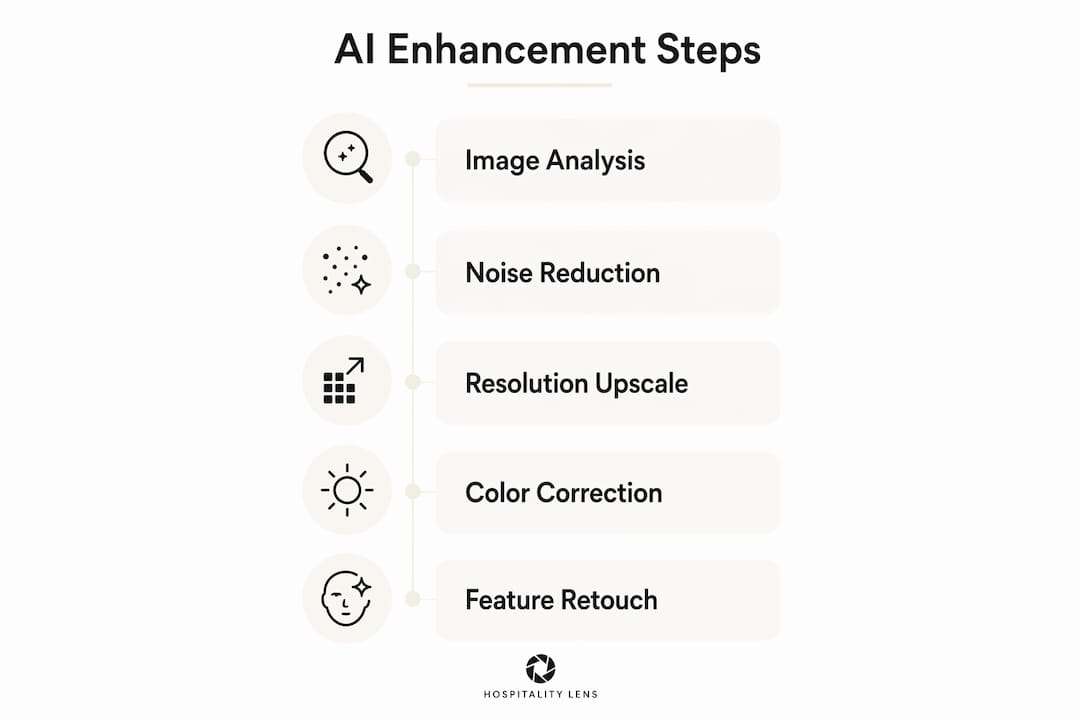
Stage 1: Image analysis. The model uses computer vision to interpret the photo’s content. It identifies faces, lighting conditions, background elements, and areas of damage or blur. This contextual read shapes every decision that follows.

Stage 2: Noise reduction and intelligent sharpening. Deep learning models separate genuine image detail from random noise. Unlike traditional noise filters that blur everything uniformly, AI models preserve edge detail while suppressing grain. The result is a cleaner image that still looks sharp.
Stage 3: Resolution enhancement. Super-resolution models, such as Real-ESRGAN, upscale the image by generating plausible pixel data in the gaps between existing pixels. The model draws on patterns learned from millions of real images to fill in texture that looks correct for the scene.
Stage 4: Color correction and lighting adjustment. The model analyzes white balance, exposure, and shadow detail. It adjusts color temperature and dynamic range to match natural lighting conditions. For property photos, this stage is often the most visible improvement.
Stage 5: Object-specific retouching. Face-specific models like GFPGAN apply targeted restoration to facial features. For hospitality and real estate photos, this stage handles details like window glare, reflections, or minor clutter that distract from the space.
The entire process runs within seconds for most consumer-grade tools. That speed is what makes AI enhancement practical for teams managing dozens or hundreds of listing photos at once.
Pro Tip: When evaluating an AI enhancement tool, upload a photo with mixed problems: underexposure, slight blur, and a cluttered corner. A tool that handles all three without over-sharpening the noise is trained on realistic degradation data. One that makes the blur worse or the colors garish is not.
What are the nuances and challenges in AI image enhancement?
The biggest risk in AI image enhancement is hallucination. GAN-based models generate detail that looks plausible but is not accurate. A face restoration model might add pores and eyelashes that were never in the original photo. For personal photography, that may be acceptable. For commercial property photos or real estate listings, it is a credibility problem.
“Older GAN enhancement models risk hallucinating sharp yet inaccurate details. Newer diffusion-based models mitigate this by better uncertainty awareness, which is crucial for realistic commercial photography where trustworthiness is key.”
Diffusion-based models have replaced GANs as the current standard for high-quality restoration. They generate detail more carefully, sampling from a probability distribution rather than forcing a single output. The result is more controlled and less prone to artificial-looking textures.
Degradation modeling is the other factor most people overlook. A model trained only on simple Gaussian blur performs poorly on real-world photos that contain film grain, chemical fading, motion blur, and compression artifacts simultaneously. Models trained on realistic damage combinations handle diverse photo defects far better. This is why two tools using the same base architecture can produce dramatically different results on the same input photo.
Frontier AI models process the entire image at once rather than passing it through separate specialized modules. That integrated approach prevents artifact accumulation. When a cascaded pipeline hands an image from a noise-reduction module to a sharpening module to a color module, each step can introduce small errors that compound. End-to-end models avoid that problem by making all corrections in a single coherent pass.
What are the practical benefits and applications of image enhancement?
The benefits of image enhancement are concrete and measurable for anyone working with visual content professionally. Here is what well-trained AI enhancement actually delivers:
- Improved clarity. Blurry or soft images become sharp enough for print and web publication without manual retouching.
- Color fidelity. Flat or color-shifted photos get accurate white balance and natural saturation, not oversaturated filters.
- Noise removal. High-ISO grain and low-light noise disappear without the smeared, watercolor look that older filters produce.
- Detail restoration. Textures in fabrics, wood grain, and architectural surfaces come back from compressed or low-resolution originals.
- Fast turnaround. Processing happens in seconds, not hours, making it practical for bulk photo workflows.
- Commercial usage rights. Most professional enhancement services deliver images cleared for use in advertising, listings, and marketing campaigns.
For photographers, AI enhancement salvages captures that would otherwise be unusable. A dark interior shot taken on a phone camera can become a clean, well-lit image ready for a portfolio or client delivery. For digital marketers, enhanced product and property images drive higher engagement because they communicate quality before a viewer reads a single word.
For property managers and hospitality teams, the application is direct. A listing photo is the first decision point for a potential guest. Dark, crooked, or cluttered photos signal neglect, regardless of how good the actual property is. AI enhancement corrects lighting, straightens perspective, removes distractions, and produces booking-ready property photos without requiring a new photoshoot. That is the practical case for understanding this technology, not just as a curiosity, but as a workflow tool.
Key Takeaways
AI image enhancement works by combining computer vision analysis, deep learning noise reduction, super-resolution upscaling, and color correction into a single automated process that generates new visual detail rather than simply redistributing existing pixels.
| Point |
Details |
| Traditional vs. AI methods |
Traditional techniques redistribute existing data; AI generates new pixels from learned textures. |
| Five-stage AI workflow |
Analysis, noise reduction, super-resolution, color correction, and object retouching run in sequence. |
| Diffusion models over GANs |
Diffusion-based models reduce hallucinated detail and produce more trustworthy commercial results. |
| Degradation modeling matters |
Models trained on realistic photo damage outperform those trained only on simple blur. |
| Commercial applications |
Enhanced images improve listing engagement, marketing quality, and portfolio consistency without a photoshoot. |
The HospitalityLens team’s take on what actually matters here
The technology conversation around image enhancement tends to focus on which model architecture is newest. That misses the practical question: does the output look like a real photo of a real place?
We have seen property photos processed by tools that technically use diffusion models but are still trained on narrow datasets. The results look over-processed. Walls get a painted-on texture. Windows lose their natural glare. The space stops looking like somewhere a guest would actually stay. The architecture matters less than the training data and the quality controls built around it.
The tools worth trusting are the ones that know when to stop. Over-sharpening is as damaging as under-sharpening. A photo that looks artificially crisp signals manipulation to a viewer, even if they cannot articulate why. Natural-looking results come from models that understand realistic degradation, not just models that maximize sharpness scores on benchmark datasets.
For property managers specifically, the goal is not the most technically impressive enhancement. The goal is a photo that makes a guest feel confident about booking. That means accurate colors, honest lighting, and a clean composition that reflects the actual space. AI enhancement gets you there faster and more consistently than manual editing, but only when the tool is calibrated for realism rather than spectacle.
— The HospitalityLens Team
How HospitalityLens applies image enhancement to property photos
HospitalityLens applies AI image enhancement directly to the practical needs of property managers, Airbnb co-hosts, and hospitality teams who cannot afford to wait for a photoshoot every time a listing needs updating.

Free watermarked preview. Pay only if you like it. No card is required to create the free watermarked preview. See current pricing for unlocks, one-time packs, and subscriptions.
FAQ
What is image enhancement technology?
Image enhancement technology is the automated process of improving an image’s visual quality using algorithms and AI. It adjusts sharpness, color, noise, and resolution to produce a cleaner, more accurate result.
How does AI image enhancement differ from traditional methods?
Traditional methods like histogram equalization only redistribute existing pixel data. AI enhancement generates new pixel information based on patterns learned from real images, making it effective for low-resolution or heavily degraded photos.
What are GANs and diffusion models in image enhancement?
GANs use two competing neural networks to generate realistic image detail. Diffusion models are the newer standard and produce more controlled results with fewer hallucinated textures, making them better suited for commercial photography.
What are the main benefits of image enhancement for property listings?
AI enhancement corrects lighting, color, and perspective in minutes, producing booking-ready photos without a photoshoot. That directly improves listing quality on platforms like Airbnb, Vrbo, and Booking.com.
Test the tool with a photo that has multiple issues at once, such as low light, blur, and noise. Tools trained on realistic degradation modeling handle mixed defects naturally. Tools trained only on simple blur produce uneven or over-processed results.
Recommended