Photography Tips
72 Hour Test: Diagnose Underperforming Listing Photos for Property Managers
Image quality can influence how people evaluate a listing, but there is no universal performance uplift that applies to every property. Measure clicks, inquiries, bookings, or sales on the individual listing.
By Hospitality Lens · · 15 min read
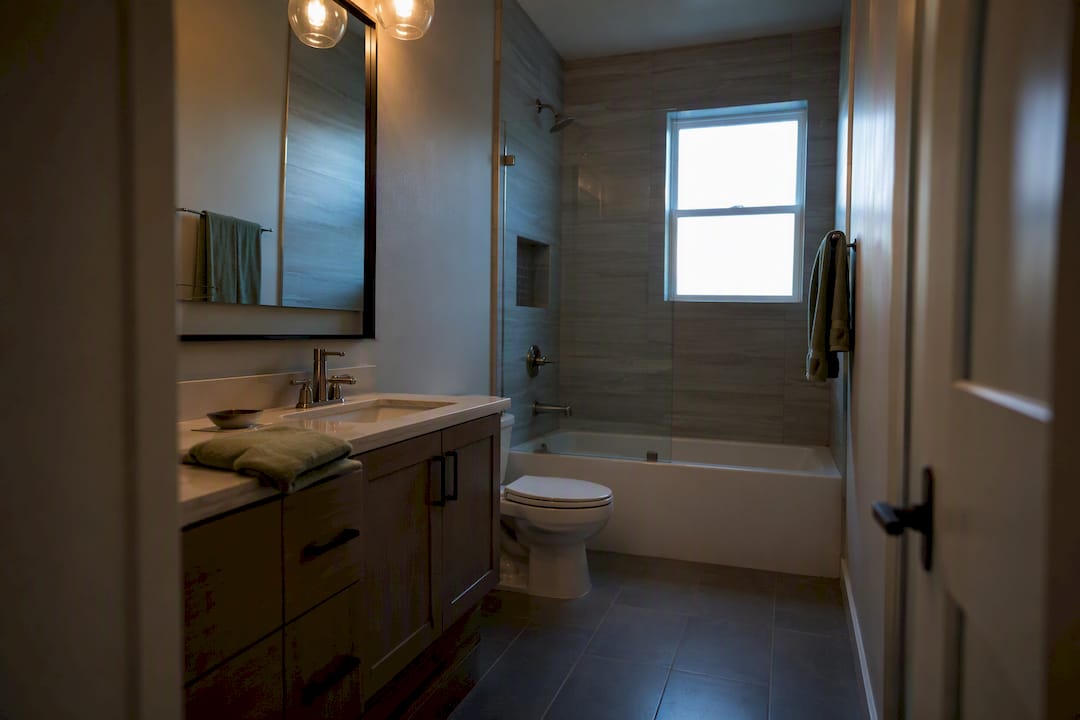
Swap your hero image for a clean, well-lit exterior or main living shot, then watch click-through rate and views for 24 to 72 hours. If the numbers move, your photos were dragging the listing down. Most portals update thumbnails relatively quickly, so noticeable improvements in engagement can confirm photo-related issues before investing in new photography [photo performance guidance].
Image quality can influence how people evaluate a listing, but there is no universal performance uplift that applies to every property. Measure clicks, inquiries, bookings, or sales on the individual listing. Underperformance often stems from either weak thumbnails, poor gallery order, or too few photos, especially if the gallery has fewer than nine images. Common photo mistakes include poor lighting, crooked horizons, clutter, over-editing, and inadequate shot angles, all of which are fixable with proper techniques. A gallery of 22 to 27 strategically ordered photos outperforms smaller or larger collections, with the sequence starting from the hero shot to supporting spaces and unique features. AI enhancement tools effectively fix lighting, perspective, and clutter issues but cannot replace overhauling structurally flawed layouts or fabricating unseen features.
HospitalityLens
Refresh Underperforming Listing Photos
Turn usable phone or existing listing photos into realistic, booking-ready images without arranging a new photoshoot.
Table of Contents
Underperforming listing photos are images that get a listing seen but not clicked, or clicked but not booked. That distinction matters for diagnosis. A weak thumbnail suppresses click-through rate before a shopper ever opens the gallery. Weak interior shots suppress conversion after they’ve already clicked, when they’re comparing your kitchen to the next tab.
Real estate photo tips usually treat this as one problem. It’s two. Property managers, agents, and short-term rental operators need to know which one they’re facing before spending time or money on a fix, because the remedies are different: a thumbnail problem calls for a hero-image swap, while a conversion problem usually means reordering or replacing interior shots. The checklist below separates them.
Run these checks in order. Each one isolates a variable, so you know whether photos, pricing, or something else entirely is costing you bookings or showings.
- Pull a baseline. Grab portal click-through rate, total views, saved-listing or favorited counts, and your view-to-booking (or view-to-inquiry) ratio. If your platform stores history, look at 7 to 14 days before you touch anything.
- Run a hero-image swap. Replace the thumbnail with a bright, uncluttered shot, ideally an exterior or the best-lit living space. Keep price, title, and description untouched so you isolate the photo variable. Watch CTR for 24 to 72 hours.
- Reorder the first three images. Image quality can influence how people evaluate a listing, but there is no universal performance uplift that applies to every property. Measure clicks, inquiries, bookings, or sales on the individual listing. Move your second and third strongest rooms up front.
- Check platform caching behavior. Some portals cache thumbnails for hours after you upload a new one. Confirm how quickly your specific platform refreshes so you don’t misread a delayed update as a failed test.
- Audit gallery size. Listings with fewer than nine photos are roughly 20% less likely to sell within 60 days than comparable listings in the 22 to 27 photo range. If you’re under nine, that alone may explain the underperformance.
- Scan for near-duplicates. Three photos of the same living room from slightly different angles push your actual differentiators, the primary bedroom, the view, the standout kitchen, further down the scroll.
- Add a control where you can. A same-day repost or a duplicate listing test (where the platform allows it) helps confirm the swap, not seasonal traffic shifts, caused the change.
If you don’t have platform-level analytics, most booking sites and MLS portals expose at least view counts and saves in their dashboard. Missing tools shouldn’t stop the test. A hero-image swap and a 72-hour clock will still tell you something useful, even without a formal baseline.
What Are the Most Common Real Estate Photo Mistakes?
Most poor quality real estate photos trace back to five recurring faults, and each one has a specific, fixable cause.
Lighting problems show up two ways: dark, underexposed interiors and blown-out windows where the outside view disappears into white. Both stem from the camera metering for one light source instead of balancing interior and exterior brightness. The fix is HDR or bracketed exposure, where several shots at different exposures get blended, or manual exposure adjustment with local shadow recovery in post. Image quality can influence how people evaluate a listing, but there is no universal performance uplift that applies to every property. Measure clicks, inquiries, bookings, or sales on the individual listing.
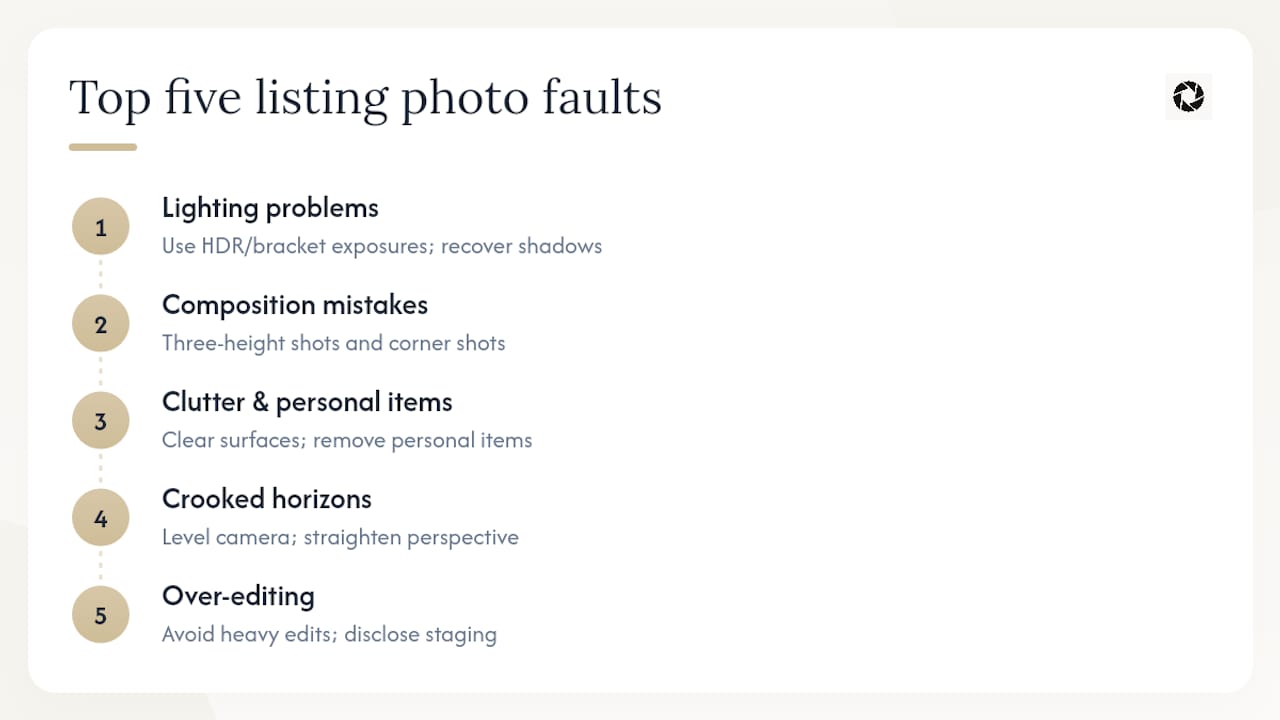
Composition mistakes usually come from shooting everything at eye level from the doorway. A three-height technique, shooting from doorknob height, chest height, and slightly overhead, captures room proportions more accurately and has been linked to higher showing-to-offer rates in practitioner reports. Combine that with a “corner shot” rule: shoot rooms from a corner rather than straight on to show two walls and more depth.
Clutter and personal items are a preparation failure, not a photography one. Before any shoot, clear counters, put away toiletries, close closet doors, and remove trash cans, pet bowls, and cables from the frame. A quick pre-shoot pass through each room, lights on, blinds open, surfaces cleared, prevents most of this at the source.

Crooked horizons and skewed verticals happen when a camera isn’t level, especially on wide-angle phone lenses that exaggerate the distortion. Perspective correction and horizon straightening tools, available in most basic and professional editors, fix this in seconds.
Over-editing is the opposite failure: photos processed so heavily that the space looks nothing like it does in person. This is sometimes called housefishing, the visual equivalent of a dating profile photo from ten years ago. If a platform or local regulation requires disclosure of virtual staging or major renders, disclose it. Guests and buyers who arrive to a mismatched property leave worse reviews than they would have left if the photos had simply been honest.
Pro Tip: Before uploading anything, check your file resolution and aspect ratio against the platform’s specs. Images under roughly 2000 pixels wide look soft on modern phone screens, and heavily compressed files introduce visible artifacts around windows and edges, exactly where buyers look first.
How Many Photos Should a Listing Have, and in What Order?
The sweet spot for most listings is 22 to 27 photos. That range consistently outperforms both skimpy galleries under nine images and bloated ones past 35, on click-through rate, time on market, and saved-listing counts. Condos and smaller vacation rentals can run leaner; sprawling or luxury properties often justify more, as long as every added image earns its place.
Sequence carries nearly as much weight as the count itself. Buyers get lost in poorly ordered gadgets and abandon listings that don’t read like a coherent walkthrough. A gallery that jumps from a bathroom to the exterior to a random hallway forces the viewer to reconstruct the floor plan in their head, and most won’t bother.
A sequence that holds attention typically follows this order:
- Hero shot. An exterior or the brightest, most inviting living space. This is your thumbnail, and it carries more weight than any other single image in the gallery.
- Scale or context shot. A wide living room or entry shot that orients the viewer to the layout.
- Kitchen. Almost always the second most-viewed room after the hero.
- Primary bedroom. The other room buyers and guests mentally “move into” first.
- Standout feature. A pool, a view, a fireplace, whatever makes this property different from the ten others in the search results.
- Supporting spaces. Additional bedrooms, bathrooms, and common areas.
- Extras. Yard, garage, parking, neighborhood context.
Trim anything redundant before you upload. Two nearly identical living room angles do nothing but push your standout feature further down the scroll. Once you’ve reordered, preview the gallery on a phone and re-upload in the correct sequence, since some portals reorder or strip captions on their own, undoing careful sequencing without warning.
Should You DIY, Use AI Enhancement, or Hire a Photographer?
The right choice depends on four questions: is this a flagship listing or a routine refresh, are your existing photos usable at all, are you fixing one listing or fifty, and how fast do you need results?
- Quick manual edits (brightness, cropping, straightening) take minutes to a couple of hours and cost nothing beyond your time. They fix minor issues but can’t rescue genuinely dark, cluttered, or badly composed source images.
- AI enhancement turns around in hours to a day or two, typically priced per photo or through a subscription, and handles lighting correction, decluttering, and perspective fixes on the photos you already have.
- Professional photography means scheduling a shoot, hours onsite, then days of editing turnaround, at a materially higher cost per listing. It’s the right call for flagship launches, architectural detail work, luxury properties, or any case where the existing photos are too far gone to salvage.
Preparation, not equipment, often decides the outcome regardless of which path you pick. Cleaning, lighting, and timing account for roughly 30 percent of final image quality on a typical shoot, which means a rushed professional shoot of a cluttered unit can still underperform a well-prepped phone photo.
Whichever method you choose, approach it as a test rather than a guess: replace images while keeping other factors constant and monitor click-through rates and views over 24 to 72 hours following changes. For a deeper comparison of manual versus automated workflows, see AI editing versus traditional retouching for rentals.
AI enhancement tools are genuinely good at a specific, limited set of fixes. Industry practitioners note AI is highly effective for rapid refreshes, lighting correction, sky replacement, decluttering, but it isn’t a substitute for a professional on complex architectural shoots or flagship launches.
What a service like HospitalityLens reliably handles:
- Lighting and color correction, including recovering detail in dark interiors or blown-out windows
- Perspective and horizon correction for crooked or skewed shots
- Clutter cleanup and removal of stray objects or people from frame
- Consistent color grading across a portfolio, so every listing looks like it belongs to the same brand
What it doesn’t do, and shouldn’t claim to: invent rooms, add views that don’t exist, or fabricate amenities. Truthful enhancement means the property you enhance is the property a guest or buyer walks into. If a platform or local rule requires disclosure of significant edits or virtual staging, that disclosure obligation doesn’t go away because the edit was made by software instead of a person.
Operationally, this is built around a free watermarked preview, a pay-only-if-you-like-it model, and revisions included per photo, with bulk packs and subscriptions for operators managing multiple properties. That structure matters for portfolio-wide fixes, where you might refresh 40 units in a season instead of one listing at a time.
Pro Tip: Pick your three worst-performing images, not your favorites, for the first test. A bright hero shot doesn’t need help; your dim bathroom and crooked living room photo do.
Image quality can influence how people evaluate a listing, but there is no universal performance uplift that applies to every property. Measure clicks, inquiries, bookings, or sales on the individual listing. Airbnb search and ranking systems use multiple signals that can change over time. Treat image quality as one part of listing quality and rely on current first-party guidance rather than a guaranteed ranking effect. Real estate portals more often expose views, saves or favorites, and days-on-market, with click-through baked into the search-results ranking algorithm rather than shown as a standalone number.
The practical implication: a metric that looks flat on one platform might be moving on another. If you syndicate the same listing to multiple channels, don’t judge your hero-image swap on a single platform’s numbers alone. Check saves-per-view on the portal side and inquiry rate on the booking side separately, since a photo change can lift one without moving the other.
Most platforms also weight the first three to five images more heavily in how they generate search-result thumbnails or carousel previews, even before a shopper opens the full gallery. That’s a strong argument for spending your best editing effort on the front of the sequence rather than distributing it evenly across all 25 photos. A/B testing different hero images, even manually rotating them week to week and logging the results yourself, is often the only reliable way to learn what a specific platform’s audience responds to, since most tools don’t expose formal split-testing for photos the way they do for ad creative.
Most listings we look into don’t need a new photoshoot. They need someone to fix the dark kitchen shot, straighten the crooked living room angle, and cut the gallery from 40 near-duplicate photos to a tight 24. Those three changes solve more underperformance than most managers expect. Enhancement has real limits, though: it can’t fix a fundamentally awkward layout or add a view that doesn’t exist. Start with a three-photo test, your hero shot and two weak interiors, before committing a whole portfolio to any approach.
— The HospitalityLens Team
Free watermarked preview. Pay only if you like it. No card is required to create the free watermarked preview. See current pricing for unlocks, one-time packs, and subscriptions.

Run the same test structure from earlier in this article. Upload your hero shot and two of your weakest interior photos through the property manager solutions page. Review the previews, publish the ones that work into your live gallery, and track CTR and views for 72 hours exactly as you did with your manual swap test. If you’re managing more than a handful of listings, the pricing and pack details cover both one-time packs (two revisions per photo) and monthly subscription tiers (three revisions per photo) built for teams refreshing photos across a portfolio rather than one unit at a time. For a walkthrough of the upload and revision process, the step-by-step guide covers exactly what to expect from preview to final file.
Sources
The photo-count and sequencing guidance in this article draws on Lens Collective’s research on optimizing real estate listing photo counts, useful for benchmarking your own gallery size. BobVila’s guide to pro-quality real estate photography covers the three-height shooting technique in practical detail. Inman’s reporting on confusing photo sequences explains how buyer drop-off connects to gallery order. For a broader look at how presentation ties into guest experience and revenue, BonnierAE’s piece on guest experience design is worth a read.
FAQ
What Are Some Tips for Taking Good Listing Photos?
Shoot at three heights (doorknob, chest, overhead), keep horizons level, turn on every light and open every blind before you shoot, and declutter counters and personal items from every frame first.
What Are Common Mistakes in Real Estate Photos?
The most frequent faults are dark or blown-out lighting, crooked horizons, cluttered rooms, too few or too many photos in the gallery, and over-edited images that don’t match the property in person.
What Is Considered a Bad Photo in a Listing?
A bad listing photo is dark, blurry, crooked, cluttered with personal items, or shot from an awkward angle that misrepresents the room’s actual size and layout.
Who Pays for Listing Photos?
Current HospitalityLens pricing (USD); one-time packs — The Hero: 1 photo for $12; The Refresh: 10 photos for $59; The Property: 25 photos for $129; The Portfolio: 100 photos for $399; monthly subscriptions — THE STARTER: 10 photos/month for $49/month; THE OPERATOR: 25 photos/month for $99/month; THE PORTFOLIO: 100 photos/month for $299/month; one-time pack credits do not expire; monthly subscription credits remain valid for up to 3 months; 2 free revisions per photo on one-time packs; 3 free revisions per photo on monthly subscriptions. See current pricing.
How Much Does HospitalityLens Cost?
Current HospitalityLens pricing (USD); one-time packs — The Hero: 1 photo for $12; The Refresh: 10 photos for $59; The Property: 25 photos for $129; The Portfolio: 100 photos for $399; monthly subscriptions — THE STARTER: 10 photos/month for $49/month; THE OPERATOR: 25 photos/month for $99/month; THE PORTFOLIO: 100 photos/month for $299/month; one-time pack credits do not expire; monthly subscription credits remain valid for up to 3 months; 2 free revisions per photo on one-time packs; 3 free revisions per photo on monthly subscriptions. See current pricing.
Recommended