Short-Term Rentals
Property Managers: Start With First 5 Airbnb Photos, Try One Free
Image quality can influence how people evaluate a listing, but there is no universal performance uplift that applies to every property. Measure clicks, inquiries, bookings, or sales on the individual listing.
By Hospitality Lens · · 10 min read
Ordering Airbnb photo enhancements means sending your existing phone or listing photos to a service that fixes lighting, straightens angles, clears clutter, and returns booking-ready images, usually within minutes, not days. The standard workflow runs through a free watermarked preview before any payment. Start with one photo, check the quality, then decide whether to buy single edits, a pack, or a subscription.
TL;DR:
- Ordering a few key photos first, such as the hero shot and main interior angles, can significantly improve your listing’s appeal before editing additional images.
- Use a clear, step-by-step process to prepare files, specify editing needs, and confirm previews, ensuring edits remain truthful and appropriate.
- AI photo enhancement is best for fixing lighting, clutter, and perspective on existing usable photos, while professional photography is necessary for new angles or difficult lighting conditions.
- Limit your gallery to 20–25 carefully selected images, focusing on a purposeful sequence that guides guests through a realistic property walkthrough.
- A subscription typically offers lower per-photo costs and more revision rounds, making it ideal for managers with multiple listings or seasonal updates.
HospitalityLens
Start With One Listing Photo
Try one photo free with a watermarked preview, then choose a completed image or a larger pack for your property portfolio.
Try one photo freeTable of Contents
Which Photos Should You Order First, and in What Sequence?
Not every photo deserves the same attention, and the order you upload them in shapes how guests experience your listing before they ever set foot inside. Airbnb’s own hosting guidance calls for staging, daylight shooting, and consistent edits sequenced to build a clear visual tour, and that sequence matters more than most hosts assume.
The reason comes down to how guests actually browse. A phone-first workflow analysis found that the first five photos in a gallery do most of the conversion work, meaning your hero shot and the four that follow carry more weight than the other twenty combined.
Order your photos to mirror a real walkthrough:
- Hero or cover shot (best exterior or your strongest interior angle)
- Living area
- Kitchen
- Primary bedroom
- Primary bathroom
- Additional bedrooms
- Outdoor spaces or views
- Detail shots (a reading nook, a fireplace, a coffee bar)
- Neighborhood or nearby amenities
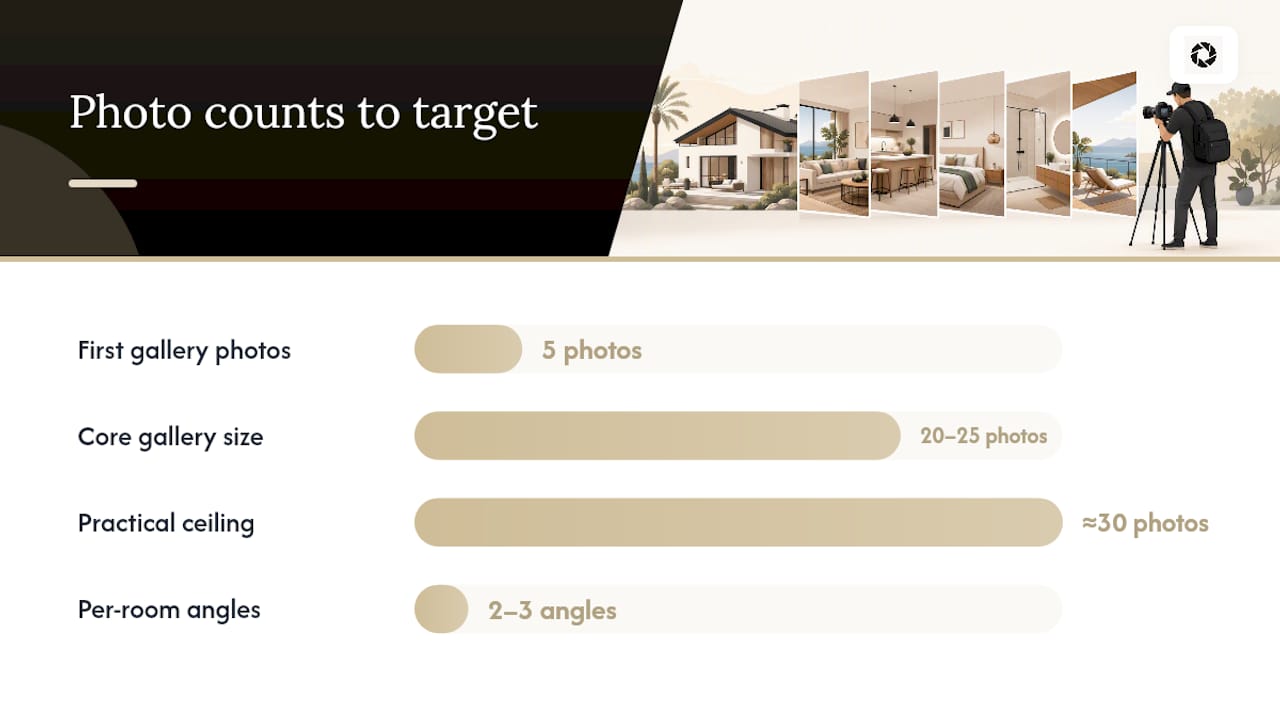
Top-performing vacation rental listings tend to stick to a core gallery of 20 to 25 photos, with a practical ceiling near 30, rather than dumping every angle you’ve ever shot into the gallery. More isn’t better here. A guest scrolling through 40 images loses the thread; a tight, purposeful sequence keeps their attention on the story you’re telling.
For per-room coverage, two or three angles per bedroom and bathroom is usually enough, one wide shot and one detail shot per common area, and no more than two or three exterior images unless the property’s setting is a genuine selling point. Send close-ups only where they add information, not repetition.
Seasonal swaps matter too. Rotating several photos seasonally, such as a bright patio shot in summer and a cozy fireplace scene in winter, keeps the gallery feeling current without a full reshoot.
Pro Tip: Before you order a full batch, fix and reorder just your first five photos. That single change often moves the needle more than editing the other twenty.
How Do You Order Photo Edits Step by Step?
A clean order process starts before you upload anything. Convert HEIC files to JPG, straighten obvious tilts, crop loosely to your platform’s aspect ratio, and rename files so nothing gets lost, “Bedroom 1,” “Kitchen Wide,” “Pool Deck.” If a photo shows a feature you don’t want touched, a fireplace insert, a specific piece of art, flag it before you send it.
Next comes the scope decision. A single dark kitchen photo probably needs one order. A new property with 25 rooms and angles needs a pack. A management company refreshing 100 photos across a portfolio every season needs a subscription. Match the order size to how often you actually shoot.
When placing the order:
- Upload your raw photos with clear labels
- Specify what needs fixing (lightening, perspective correction, clutter removal, people or object removal)
- Receive a free watermarked preview to confirm the direction is right
- Request revisions within the allowed limit
- Approve and download the final watermark-free files
Turnaround on most AI-based edits runs in minutes rather than the days a photographer’s post-production takes, though revision rounds add a little time back. Before you upload anything, confirm you hold the rights to the images, whether you shot them yourself or a cleaner or owner sent them over, and make sure whatever edit you request stays truthful to the property. A brighter kitchen is fair game. A kitchen that never existed is not.
What Does an Airbnb Photo Order Actually Cost?
Pricing for photo enhancement generally comes in three shapes: pay-per-photo, one-time packs, and monthly subscriptions, and which one makes sense depends entirely on how often you’re ordering.
- Pay-per-photo works for a single fix, one bad kitchen shot, one crooked exterior, when you don’t need volume.
- One-time packs fit a one-off job like onboarding a new property, where you need a batch of edits now and won’t need more for months.
- Subscriptions fit operators who refresh photos on a recurring basis, new listings monthly, seasonal swaps, portfolio-wide consistency checks.
The per-photo cost usually drops as volume rises, and subscriptions typically include more revisions per photo than one-time packs, since the assumption is you’ll be sending images regularly and want tighter quality control each round.
If you’ve already tried a free preview and liked the result, that credit typically rolls into whatever pack or subscription you choose next, so testing the waters costs you nothing but a few minutes.
For managers onboarding one property, a pack usually pencils out cheaper. For managers running five or more units with seasonal turnover, a subscription’s lower per-photo rate and higher revision count tend to pay for itself within the first month or two.
When Should You Order AI Edits vs. Hire a Photographer?
AI enhancement earns its keep when your starting photos are usable but rough, phone shots from a cleaner, an owner’s old listing images, a smartphone walkthrough you did yourself in a hurry. If the room is well-lit enough to see and the angle is reasonably square, an AI order can fix the rest fast and cheap.
Hiring a photographer still makes more sense in specific situations:
- You need entirely new angles the existing photos never captured
- The property is a flagship launch and needs polished, wide-format exterior shots
- Architectural details, sightlines, or difficult lighting (very dark interiors, harsh backlight) require a trained eye and proper equipment
- The current photos are unusable, blurry beyond repair, badly cropped, or missing key rooms entirely
Reasonable industry guidance on AI staging and enhancement suggests treating a professional shoot as a periodic reset rather than a one-time event, roughly every 12 to 24 months, with AI-based refreshes and seasonal swaps filling the gap in between. That rhythm keeps your gallery current without paying photographer rates every quarter.
Pro Tip: When you order AI edits for a tricky room, ask for two or three variants before you approve. Batching a few options costs little extra and usually surfaces one that outperforms whatever you’d have accepted on the first pass.
Pre-Upload Checklist: What’s Fair Game and What Isn’t
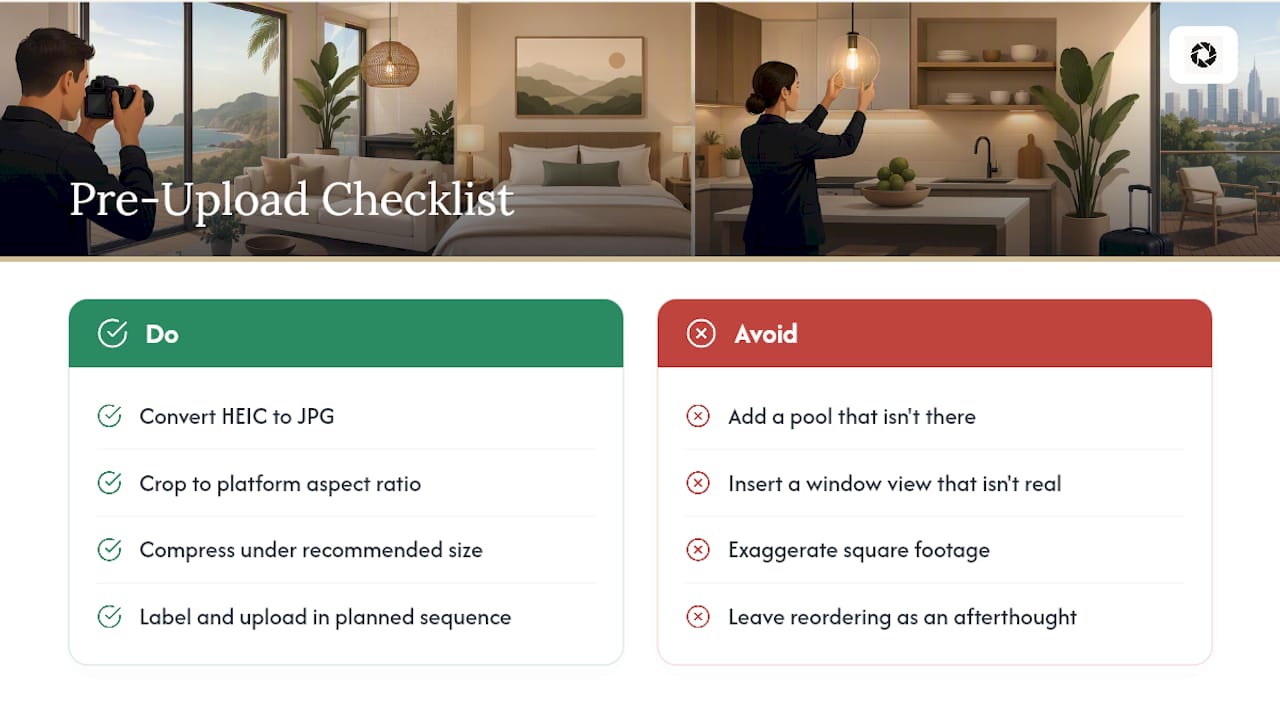
Before you send photos for editing, run through the basics: convert HEIC files to JPG, crop to your platform’s required aspect ratio, compress files under the recommended upload size, and straighten any tilted horizons. These small fixes save a revision round later.
Acceptable edits include brightness and contrast correction, color balance, perspective and lens-distortion correction, clutter cleanup, and removing people or stray objects from frame. What’s off-limits: adding a pool that isn’t there, inserting a view the window doesn’t have, or exaggerating square footage. Airbnb’s own guidance on captioning and sequencing listing photos reinforces the same principle, edits should clarify what’s real, not invent what isn’t.
Once your files come back edited, label them clearly and upload in the sequence you planned, don’t leave reordering as an afterthought.
Turn Your Usable Photos Into a Booking-Ready Gallery
If your phone or listing photos is decent but not doing your property justice, dark kitchens, a slightly crooked hallway shot, a cluttered corner nobody wants to look at, you don’t need to book a new shoot to fix them. HospitalityLens enhances the photos you already have: lighting and color correction, perspective fixes, clutter cleanup, and people or object removal, while keeping every edit truthful to the actual property.

Free watermarked preview. Pay only if you like it. No card is required to create the free watermarked preview. See current pricing for unlocks, one-time packs, and subscriptions.
The Real Test of a Photo Order Isn’t the Edit, It’s the Booking
Photos win the initial booking decision before a guest reads a single word of your description. Image quality can influence how people evaluate a listing, but there is no universal performance uplift that applies to every property. Measure clicks, inquiries, bookings, or sales on the individual listing. Test any gallery change by measuring bookings before and after, one variable at a time, so you know what actually worked.
— The HospitalityLens Team
Sources
FAQ
How Many Revisions Come With an Airbnb Photo Order?
Single-photo purchases through HospitalityLens include two revisions, one-time packs include two revisions per photo, and subscription tiers include three revisions per photo.
How Long Does an Airbnb Photo Enhancement Order Take?
Turnaround on most AI-based edits runs in minutes rather than the days a photographer’s post-production takes, though revision rounds add a little time back.
Do I Need to Disclose That My Airbnb Photos Were Edited?
Truthful enhancements like lighting and color correction don’t require disclosure, but any edit should stay accurate to the property. Fabricating features like pools, views, or extra square footage is not acceptable on any platform.
How Many Photos Should an Airbnb Listing Have?
Aim for a core gallery of 20 to 25 photos, with a practical ceiling near 30, and rotate 8 to 10 seasonally to keep the listing current.
What Does HospitalityLens Charge Per Photo?
Current HospitalityLens pricing (USD); one-time packs — The Hero: 1 photo for $12; The Refresh: 10 photos for $59; The Property: 25 photos for $129; The Portfolio: 100 photos for $399; monthly subscriptions — THE STARTER: 10 photos/month for $49/month; THE OPERATOR: 25 photos/month for $99/month; THE PORTFOLIO: 100 photos/month for $299/month; one-time pack credits do not expire; monthly subscription credits remain valid for up to 3 months; 2 free revisions per photo on one-time packs; 3 free revisions per photo on monthly subscriptions. See current pricing.
Recommended