Short-Term Rentals
How OTAs Evaluate Photo Quality for Rankings
Elevate your listing's visibility and booking success by understanding the key photo quality factors OTAs use to rank properties.
By Hospitality Lens · · 11 min read
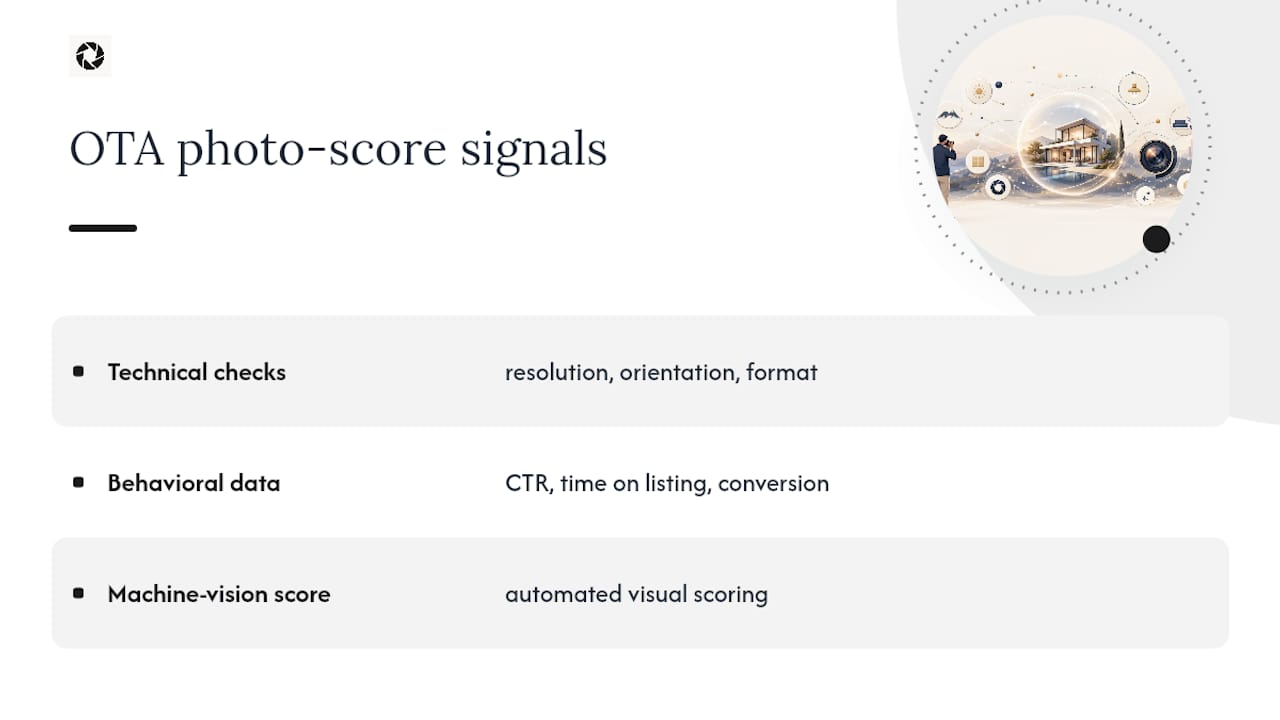
OTAs judge listing photos across three signal classes: technical file and composition checks, behavioral engagement signals, and automated machine-vision quality scoring. The combined result feeds directly into how visible your listing becomes.
Here’s the evidence behind that claim:
Work through the checklist below, then confirm what changed with an A/B test or your own booking analytics.
Key Takeaways
OTAs combine technical file checks, guest behavior data, and automated image-quality scoring to decide how much visibility your photos earn.
Free watermarked preview. Pay only if you like it. No card is required to create the free watermarked preview. See current pricing for unlocks, one-time packs, and subscriptions.
Table of Contents
What Do OTAs Actually Check Inside Your Photos?
Start with rules the platform actually publishes. Photo requirements can cover file quality, orientation, coverage, accuracy, and other listing-content standards, but platforms do not publish one universal photo-scoring formula that applies across every OTA.
Booking.com’s Partner Hub publishes photo guidance for properties. Because platform requirements change, use the current first-party guidance for your account rather than treating a copied resolution, photo-count, or quality-score threshold as permanent.
Airbnb is unusually explicit about search. Its official search-ranking guidance says listing quality includes content such as photos and videos, while listing popularity includes guest engagement. Airbnb also says high-quality media can attract attention and improve engagement, which can improve ranking. That supports a relationship between strong media and search visibility on Airbnb; it does not establish the same ranking formula for every OTA.
How Does Guest Behavior Affect Your Ranking?
For Airbnb, popularity is one of several ranking inputs, and the platform lists guest actions such as saving, booking, and messaging among its engagement signals. Photos can influence whether a listing earns attention, but a photo change is only one variable among price, availability, reviews, location, host behavior, guest preferences, and other factors.
Measure a gallery refresh as an experiment rather than a guaranteed ranking tactic: record the metrics your channel actually exposes, keep price and availability as stable as practical, annotate the date of the image change, and compare a sufficiently long before-and-after period. A change in visibility or conversion should be treated as an observed result for that listing, not as a universal percentage uplift.
Can Computer Vision Really Score Your Photos?
Yes. Computer-vision and no-reference image-quality models can score technical or perceptual image characteristics, and they are useful in research and quality-control tools. What we should not assume is that a particular OTA uses a specific published model inside its proprietary ranking system unless the platform documents that use.
Use automated image checks for practical QA—resolution, blur, exposure, obvious overlays, duplicate images, and room or amenity coverage—without presenting those checks as proof of how an undisclosed OTA ranking algorithm works.
Prioritize first-party rules for each channel, then optimize the gallery for guests. A defensible order is:
- Meet the platform’s current technical and content requirements.
- Show every important guest-accessible room and material amenity accurately.
- Use a clear lead image and a logical sequence that helps guests understand the property.
- Measure the performance data the platform actually makes available instead of relying on third-party claims about hidden scoring systems.
For Airbnb specifically, photo and video quality are documented listing-quality factors. For other OTAs, use their current first-party documentation and avoid extrapolating Airbnb’s disclosed ranking inputs to platforms that have not published the same rules.
What’s the Step-by-Step Checklist to Fix Your Photos?
Start with an audit, not a photoshoot. Walk through your current listing and build a coverage map: which rooms and amenities are shown, which are missing, and where the photos contradict your listing description.
- Audit and map. List every room and amenity your listing claims, then check it off against your current photo set.
- Select your hero. Pick the single photo most likely to earn a click, usually the best-lit, most inviting wide shot of your main living space.
- Choose 2 to 4 confirmation shots. These back up the hero’s promise and should show adjacent angles of the same space.
- Shoot or gather coverage. Fill every gap from your audit: each bedroom, each bathroom, exterior, kitchen, and any standout amenity.
- Export correctly. Match your target platform’s pixel dimensions, save as high-quality JPEG, and use sRGB color.
- Tag and upload. Label each photo to the OTA’s taxonomy (bathroom, pool, exterior) rather than leaving it uncategorized.
Before you upload, run a rejection pass:
- No people as the main subject
- No watermarks, text, or logos
- No collages
- Correct orientation and aspect ratio on every file
Pro Tip: If your existing phone photos are usable but dark, crooked, or cluttered, a service like HospitalityLens can fix lighting, straighten perspective, and remove clutter without a new shoot. If your photos are unusable, blurry beyond repair, or you’re launching a flagship property, a photographer is still the better investment.
Refresh your photo set seasonally, especially for properties with outdoor space or strong weather-dependent appeal. Our property photo optimization process covers export settings and file naming conventions in more depth.
How Do You Test Whether New Photos Actually Work?
Run a staged rollout rather than guessing. Change photos on one listing or a small batch, leave everything else untouched, and give it real time to register.
- Pick a listing (or group) with enough traffic to generate meaningful data within a few weeks.
- Replace the photos only. No pricing or description changes in the same window.
- Run the test for 2 to 6 weeks, depending on your typical booking volume.
- Track CTR and photo clicks weekly, since those move first.
- Watch booking conversion and ranking position last, since those lag behind engagement by design.
The pattern to expect: click-through and photo engagement shift within days to a couple of weeks. Booking conversion follows a few weeks after that. Ranking movement is the slowest signal and platform-dependent, sometimes taking a full month or more to register. Given that a very high proportion of shoppers say visuals influence their decisions, the engagement lift is rarely a coincidence.
Where HospitalityLens Fits in the Decision
We built HospitalityLens because most operators already have usable photos, just poorly lit, crooked, or cluttered ones. Enhancement fixes those fast and affordably while preserving your actual rooms and features. But if your photos are unusable, or you’re launching a flagship property that deserves new angles, a photographer is still worth it. Try one photo free (watermarked preview) before deciding.

Get a Booking-Ready Photo Set Without Booking a Shoot
If your current photos are usable but undersell the property, dark corners, a tilted horizon, a cluttered countertop, you don’t need to schedule a new shoot to fix them. HospitalityLens turns those existing phone or listing photos into corrected, booking-ready images: lighting fixed, perspective straightened, clutter removed, real property preserved throughout.

Free watermarked preview. Pay only if you like it. No card is required to create the free watermarked preview. See current pricing for unlocks, one-time packs, and subscriptions.
Sources
FAQ
What Are the Three Signals OTAs Use to Score Photos?
OTAs combine technical file checks (resolution, orientation, format), behavioral engagement data (CTR, time on listing, conversion), and automated machine-vision scoring to evaluate photo quality for ranking purposes.
Booking’s partner guidance recommends at least 10 photos with a minimum resolution of 2048x1080 pixels, ideally 4000x3000, shot in landscape orientation.
Can AI-Enhanced Photos Pass OTA Quality Checks?
Yes, as long as the enhancement corrects real elements of the photo (lighting, perspective, clutter) without inventing rooms or amenities. HospitalityLens focuses specifically on that kind of truthful enhancement rather than generating fictional features.
How Long Does It Take to See a Ranking Change After Updating Photos?
Click-through and photo engagement typically shift within one to two weeks, booking conversion follows a few weeks after, and ranking movement itself can take a month or more depending on the platform.
Do I Need a Professional Photographer or Can Enhancement Software Work?
If your existing phone or listing photos are usable but poorly lit, crooked, or cluttered, enhancement software can fix them quickly and affordably. A photographer is still the better choice for flagship launches, unusable original photos, or shots requiring entirely new angles.
Recommended