Real Estate
What Visual Asset Management Means for Real Estate Listings
Discover how AI-powered visual asset management quickly transforms existing property photos into booking-ready listings, saving time and money for real estate professionals.
By Hospitality Lens · · 11 min read

Visual asset management for real estate, in practical terms, means using AI to turn the photos you already have into booking-ready listing images. It’s not about organizing folders or tagging files. It’s about fixing lighting, straightening perspective, clearing clutter, and polishing the shots your cleaner or property manager took on a phone, without a new photoshoot.
For property managers juggling a dozen listings, that distinction changes the math on every onboarding and refresh. You skip the scheduling, skip the photographer invoice, and get usable images the same day.
- HospitalityLens applies this exact approach: upload existing photos, get realistic, non-invented enhancements back.
- The outcome is booking-ready photos and faster time-to-list, not a redesigned property.
- It’s a practical alternative to a new shoot in many cases, not a replacement for one in every case.
Key Takeaways
Visual asset management for real estate, in the sense that matters to hosts and property managers, means AI-enhanced editing of real photos, not synthetic staging or invented features.
Free watermarked preview. Pay only if you like it. No card is required to create the free watermarked preview. See current pricing for unlocks, one-time packs, and subscriptions.
Table of Contents
What Does AI Photo Enhancement Actually Do?
AI photo enhancement corrects what’s already in the frame. It doesn’t add anything that wasn’t there when the photo was taken.

The core edits break down into a few categories. Lighting and color correction fixes the yellow cast from a ceiling bulb or the blown-out window glare that makes a living room look washed out. Perspective and horizon correction straightens a tilted shot so walls look vertical and floors look level, a common problem with phone photos taken without a tripod. Clutter and object removal clears a trash can, a cleaning cart, or a stray extension cord from an otherwise solid shot. People removal takes out a cleaner or contractor who wandered into frame. The final pass is general polish, sharpening, and balance so the image looks like it came from a camera, not a phone.
What it does not do matters just as much. It doesn’t add a pool that doesn’t exist, swap in a mountain view, or invent a renovated kitchen. HospitalityLens draws that line deliberately: the property in the enhanced photo is the property a guest will check into.
- Lighting and color correction for dark or flat-looking rooms
- Perspective and horizon straightening
- Clutter, debris, and object removal
- People removal from otherwise usable frames
- Overall realistic polish and sharpening
Pro Tip: Send your widest, most complete room shots for enhancement first. AI correction works better on a photo that already captures the whole space than on one that’s already tightly cropped.
Why Are Hospitality Teams Switching to AI Enhancement?
Speed is the first reason teams adopt this workflow, and it’s the one that shows up fastest on a calendar. Coordinating a photographer means finding availability, prepping the unit, and waiting for edited files, often a multi-day cycle. AI enhancement compresses that editing step into minutes rather than days, which matters most when a unit needs to go live now, not next week.
Cost is the second driver, though it’s directional rather than a guaranteed savings figure for every operator. Paying per photo for enhancement instead of booking a photographer for every refresh keeps recurring expenses lower across a large portfolio, particularly for teams comparing AI editing against repeated professional retouching.
Consistency across a portfolio is the benefit that’s easy to underestimate until you’re managing 40 listings with photos shot by six different cleaners on six different phones, as detailed in The Role of Customer Reviews in Hospitality — where consistent, accurate photos directly impact guest experience and bookings. A shared enhancement standard evens out that variation.
- Same-day turnaround instead of a multi-day photographer booking cycle
- Lower recurring cost per refresh across a large portfolio
- Visual consistency across listings shot by different people
- Easy seasonal updates and hero-image testing without rebooking a shoot
Seasonal refreshes and hero-image A/B testing become realistic when editing costs per photo instead of per shoot. Swapping a winter hero shot for a summer one, or testing two different living-room angles as the lead image, is a small expense instead of a new booking.
How Do You Prepare and Submit Photos for Enhancement?
Getting good results starts before you upload anything.
- Shoot with intent, even on a phone. Turn on every light, open the blinds, and shoot each room from a corner to capture the full space. AI enhancement can fix lighting and color, but it can’t invent an angle you never captured.
- Batch your photos by property. Group all images for one listing together before uploading, rather than mixing properties in one batch. This keeps revisions and rights tracking clean if you’re managing multiple units at once.
- Sort photos by type before choosing edits. Hero exterior shots usually need perspective correction and color balance. Interior shots often need lighting correction and clutter removal. Treating them the same wastes a revision.
- Upload and select enhancements per photo. Choose the corrections that actually apply. A well-lit kitchen shot doesn’t need heavy lighting correction; a crooked hallway shot does.
- Review the output against the original. Confirm the room still looks like the room. Flag anything that looks over-processed or unrealistic before you use up a revision.
- Use your revisions deliberately. Most plans include two or three revisions per photo. Spend the first revision on the biggest issue (usually lighting or perspective) rather than small tweaks.
- Keep the original file. Store the unedited photo alongside the enhanced version. You’ll want it if a platform or regulation ever asks what the property actually looked like.
Pro Tip: Run your first batch as a small test, five or six photos from one property, before uploading your entire portfolio. It’s easier to catch a preference mismatch (like over brightened exteriors) on five photos than on 200.
This workflow mirrors what HospitalityLens outlines for realistic property photo improvement: prepare well, edit deliberately, and keep a record of what changed.
What Should You Budget for Enhancement, Turnaround, and Revisions?
Pricing scales with volume, and the per-photo cost drops meaningfully as you commit to more photos.
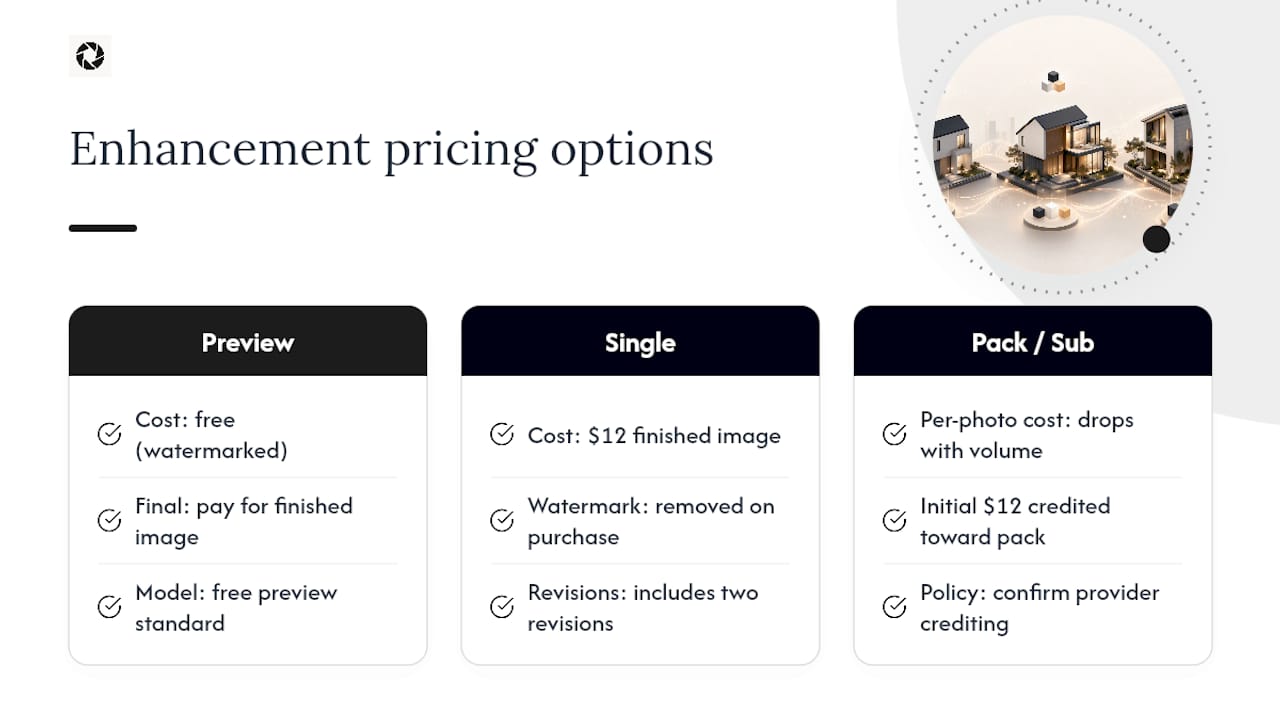
Free watermarked preview. Pay only if you like it. No card is required to create the free watermarked preview. See current pricing for unlocks, one-time packs, and subscriptions.
Keep your original photos on file regardless of provider. You may need them for platform disputes or disclosure requirements later.
How Do You Stay Truthful and Compliant With Photo Edits?
The line between enhancement and misrepresentation isn’t ambiguous, even if it feels that way when you’re staring at a dim listing photo. The National Association of REALTORS® has been direct about where that line sits.
Image enhancement crosses into misrepresentation when edits change or remove permanent features of the property. Truthful, non-misleading presentation of listings is the standard, not an optional courtesy.
That guidance, detailed by NAR, draws a clean boundary: brightening a room is enhancement, removing a support beam from the photo is not. Disclosure laws are catching up to this distinction too. California’s approach to real estate marketing disclosure is one example of a market where regulators expect sellers and agents to flag substantive edits, and that trend toward disclosure expectations is likely to spread as AI editing becomes more common in 2026 and beyond.
A simple checklist helps here. Safe without disclosure: lighting correction, color balance, straightening, removing a trash can or a stray cord, removing a person who wandered into frame. Requires disclosure or should be avoided entirely: adding furniture that isn’t there, changing the season or weather, altering the view outside a window, removing a permanent structural feature.
- Keep unedited originals on file for every listing.
- Disclose substantive edits where your state or platform requires it.
- Treat “enhanced” and “generated” as two different categories, never blur them.
When Should You Hire a Photographer Instead of Using AI?
AI enhancement earns its place fixing what’s already in a usable photo. It doesn’t earn its place inventing what isn’t.
Flagship property launches, luxury listings where architectural detail sells the price point, and any shot requiring a new angle nobody has captured yet all call for a photographer. So does verified amenity capture, a pool, a view, a renovated bathroom, where a buyer or guest needs proof the feature genuinely exists as shown.
- New angles or compositions no existing photo covers
- Architectural or luxury detail that sells a premium price point
- Verified capture of amenities like pools, views, or renovations
- Flagship listings and marketing launches
The practical middle ground most teams land on is a hybrid cadence: a professional shoot every 18 to 24 months, paired with AI enhancement for everything in between.
What the Data Actually Supports (and What It Doesn’t)
Most advice on this topic treats AI enhancement and professional photography as competitors. They’re not. They solve different problems at different price points, and the honest read of the evidence points to a hybrid model, not a replacement.
Where conventional wisdom overstates things is on both ends. Some guides imply AI enhancement can fully substitute for a photographer on any property, which ignores what enhancement can’t do: it can’t shoot a new angle or verify an amenity exists. Other guides dismiss AI enhancement as a gimmick, which ignores that routine editing tasks like lighting correction and clutter removal are genuinely faster and cheaper to automate than to outsource for every single refresh.
What we’d prioritize first, if you’re building this workflow from scratch: get your originals policy right before you get your editing preferences right. Decide now how you’ll store unedited photos and when you’ll disclose edits. That decision is harder to retrofit across 50 listings than to set up on day one. Everything else, which edits to run, how many revisions to spend, is easier to adjust as you go.
— The HospitalityLens Team
Try One Photo Free With HospitalityLens
HospitalityLens is the practical alternative to booking a new photoshoot every time a listing needs a refresh. The savings show up fastest for teams managing several properties at once: instead of paying photographer rates per visit, you pay per photo, with the cost per image dropping as volume increases.

Free watermarked preview. Pay only if you like it. No card is required to create the free watermarked preview. See current pricing for unlocks, one-time packs, and subscriptions.
Sources
FAQ
What Is Visual Asset Management for Real Estate?
It means using AI to enhance existing property photos, correcting lighting, perspective, and clutter, rather than staging new scenes or replacing photographers entirely.
Is AI Photo Enhancement the Same as Virtual Staging?
No. AI enhancement corrects real elements already in a photo; virtual staging adds furniture or features that don’t exist, which HospitalityLens does not do.
How Much Does HospitalityLens Cost per Photo?
Free watermarked preview. Pay only if you like it. No card is required to create the free watermarked preview. See current pricing for unlocks, one-time packs, and subscriptions.
Do I Need to Disclose AI-Enhanced Photos?
Disclosure depends on the edit and your local rules. Lighting and clutter fixes typically don’t require disclosure, while edits affecting permanent features generally do, per NAR guidance.
When Should I Hire a Photographer Instead of Using AI?
Choose a photographer for flagship launches, luxury detail shots, or any angle and amenity verification your existing photos don’t already capture.
Recommended