Short-Term Rentals
Photo Upgrade Platforms and Booking Site Performance
Discover how upgraded photos, especially hero thumbnails, can significantly boost your bookings and nightly rates while enhancing guest trust.
By Hospitality Lens · · 13 min read

TL;DR:
- Optimizing listing photos, especially hero thumbnails, significantly boosts bookings and nightly rates. Regular photo updates that accurately reflect the property maintain guest trust and improve search visibility. HospitalityLens offers affordable, fast, and truthful enhancement solutions with clear workflows and licensing.
Photo-upgrade platforms improve booking-site performance when they target the right things first: hero thumbnails, platform technical requirements, and truthful visual polish. Airbnb platform data shows that professionally optimized listing photos can yield up to three times more bookings and approximately 20% higher nightly rates. That gap exists because the listing photo is the first decision point, and travelers make that decision fast. Your best move right now: run one hero-thumbnail upgrade on your highest-traffic listing, preview it at thumbnail size, and measure CTR before rolling out across your portfolio.
Table of Contents
Why your hero thumbnail drives clicks more than anything else
Travelers scan search-result grids in under three seconds. They are not reading descriptions or checking amenity lists at that stage. They are reacting to a single frame, and that frame is your hero thumbnail.
Booking.com partner guidance confirms that listings with a perfect property-page score, which includes photo count, tagging, and quality, can receive up to 18% more bookings than incomplete listings. Photo tagging also affects how the platform matches your listing to search queries, so a well-tagged, high-quality gallery does double duty: it improves both visibility and conversion.
The first three photos carry the heaviest load. Research on listing optimization shows those three images influence roughly 80% of listing clicks, because they are the ones that appear in search results and grid previews. If your first photo is dark, crooked, or cluttered, most travelers never reach photo four.
Platform mechanics reinforce this. Airbnb, Vrbo, and Booking.com all surface a single thumbnail in search. On direct-booking sites, the hero image anchors the property page and sets the emotional tone before a guest reads a single word. The photo is emotional before it is rational, and that means photo quality affects brand perception in ways that pricing and copy cannot fully compensate for.
Which photo edits actually move the needle for bookings
Not all edits are equal. Some changes look impressive at full resolution but disappear at thumbnail size. Others are subtle at full size but transform how a listing reads in a search grid.
Prioritize in this order:
- Hero thumbnail crop and composition. A tight, well-composed frame with a clear focal point reads better at 300px than a wide shot with too much visual noise.
- Lighting and color correction. Dark rooms look small and uninviting. Balanced, warm light signals cleanliness and space, two things guests weight heavily.
- Perspective and horizon correction. Crooked walls and converging verticals read as amateur, even to travelers who cannot name the problem.
- Clutter and object removal. Cleaning products, personal items, and stray furniture distract from the space. Removing them digitally is faster and cheaper than reshooting.
- People removal. Guests, cleaners, or owners in frame reduce trust and make the space feel occupied rather than available.
- Truthful virtual staging. Adding furniture or decor to an empty room is acceptable when it reflects what guests will actually find. Staging amenities that do not exist is not.
A photo that looks good full-screen can still fail as a thumbnail due to poor composition or lack of contrast. That is why thumbnail-first testing matters: resize your candidate hero to roughly 300×200 pixels before publishing and check whether the key selling point of the room is still visible.
Pro Tip: Always test your hero image at thumbnail size before uploading. Open the file in any browser, shrink the window to about one-third width, and ask yourself whether the room still looks inviting. If the answer is no, adjust the crop or increase contrast before publishing.

For coastal or beach properties, prioritize outdoor and view shots in the hero position. For longer-stay urban rentals, kitchen and workspace shots often outperform living-room heroes because they signal the practical amenities remote workers and families care about most. Matching your hero to guest intent is one of the faster wins available to multi-listing teams. You can find more tactical guidance in the vacation rental photo tips resource from HospitalityLens.
AI-automated vs. manual professional enhancement
Current HospitalityLens pricing (USD); one-time packs — The Hero: 1 photo for $12; The Refresh: 10 photos for $59; The Property: 25 photos for $129; The Portfolio: 100 photos for $399; monthly subscriptions — THE STARTER: 10 photos/month for $49/month; THE OPERATOR: 25 photos/month for $99/month; THE PORTFOLIO: 100 photos/month for $299/month; one-time pack credits do not expire; monthly subscription credits remain valid for up to 3 months; 2 free revisions per photo on one-time packs; 3 free revisions per photo on monthly subscriptions. See current pricing.
Consumer tools like Adobe Express handle rapid surface fixes well. They do not replace platform-specific auditing or the bulk workflow capabilities that teams managing 10+ listings need.
Technical specs your photos must meet before you upload
Great edits fail silently if images are the wrong dimensions or too heavy for mobile. OTA platforms have resolution and file-size floors, and images below those floors may never appear in search, even after a successful upload.
| Platform |
Minimum resolution |
Recommended size |
Accepted formats |
Max file size |
| Airbnb |
— |
— |
JPG, PNG |
25 MB |
| Vrbo |
— |
— |
JPG |
10 MB |
| Booking.com |
— |
— |
JPG, PNG |
10 MB |
| Direct-booking site |
Varies by CMS |
— |
JPG, WebP |
Compress to <300 KB |
For direct-booking websites, the technical priorities shift toward page speed. Use these steps before publishing:
- Compress images to under 300 KB using a tool like Squoosh or TinyPNG without visible quality loss.
- Serve images via a CDN so load time stays fast for guests in different regions.
- Implement lazy loading so below-the-fold photos do not slow the initial page render.
- Add descriptive alt text to every image for accessibility and search indexing.
- Use responsive
srcset attributes so mobile visitors receive appropriately sized files.
Watermarks and embedded metadata are generally rejected or stripped by OTAs. Submit clean files with no overlays, and confirm your enhancement provider delivers files without watermarks on final delivery.
Workflow, pricing, and how to estimate ROI for your portfolio
Predictable turnaround times and bulk tools are the biggest operational levers for teams managing 10 or more listings. A slow or manual process creates a bottleneck every time you onboard a new property or run a seasonal refresh.
Common pricing models:
| Model |
Best for |
Typical range |
| Per-photo (single) |
Testing one listing |
$10–$20/photo |
| One-time pack |
Onboarding a new property |
$10–$15/photo |
| Monthly subscription |
Ongoing portfolio management |
$8–$10/photo |
A realistic ROI estimate for a mid-range short-term rental: if a hero-thumbnail upgrade lifts CTR by even a few percentage points on a listing with 500 monthly impressions, that translates to 15–25 additional clicks per month. At a typical short-term rental conversion rate, that can mean one or two incremental bookings per month. With an average daily rate of $150 and a three-night stay, one additional booking per month is enough to cover the enhancement cost for an entire small portfolio.
KPIs to track before and after any photo refresh:
- Click-through rate from search results (available in Airbnb host dashboard and Booking.com’s performance analysis tool)
- Conversion rate from listing page view to booking inquiry
- Occupancy rate month-over-month
- RevPAR (revenue per available room/night)
Set a baseline for each metric before publishing new photos. Wait at least 30 days before drawing conclusions, because OTA algorithms take time to re-index updated listings.
Prioritize five things: turnaround SLA, realistic fidelity (no fake amenities), bulk workflow tools, commercial usage rights, and integration support. Everything else is secondary.
Questions to ask in the first ten minutes of any demo or trial:
- What is your guaranteed turnaround time for a 25-photo batch?
- Do the final files include full commercial usage rights with no attribution required?
- How do you handle revision requests, and how many rounds are included?
- Can you process bulk uploads via a shared folder, API, or direct OTA integration?
- What is your policy on realistic staging versus adding amenities that do not exist?
Three red flags that should stop a trial immediately:
- No explicit commercial usage rights in the service agreement.
- Automated staging that adds furniture, pools, or views the property does not have.
- No defined revision policy or a “no revisions” clause buried in the terms.
Pro Tip: Ask the provider to enhance one photo before you commit to a pack. A reputable service will offer a free preview or a low-cost single-photo trial. If they resist, that tells you something about how they handle revision disputes later.
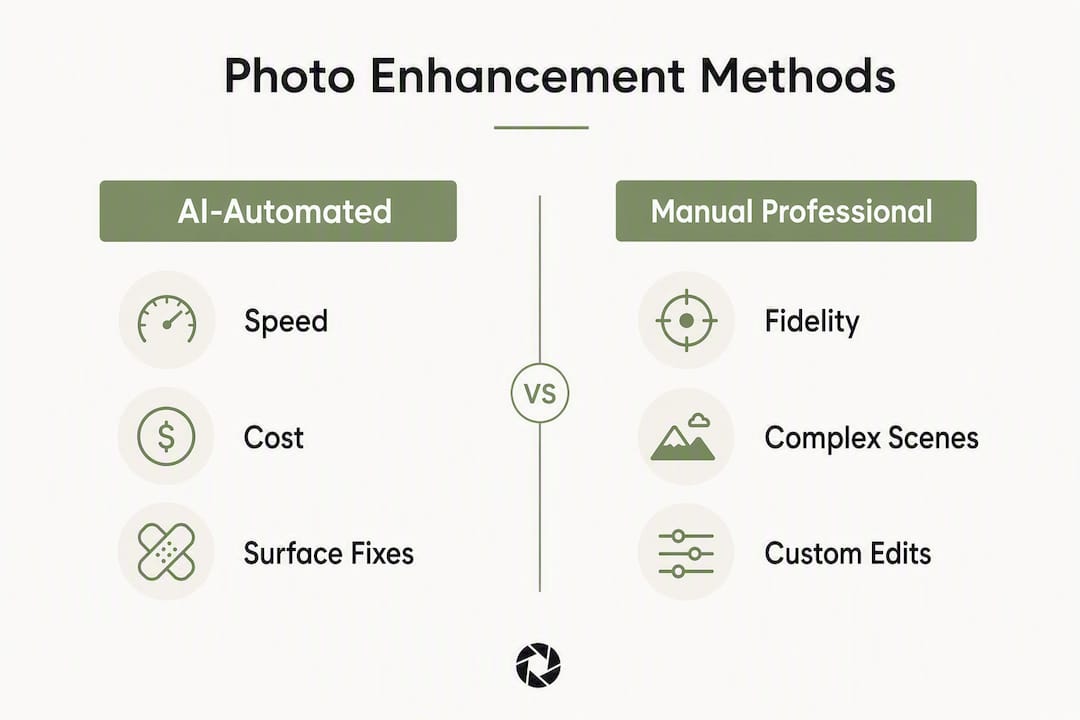
Manual professional services offer higher fidelity for complex scenes, unusual lighting, or properties where accuracy is critical. AI-automated tools are faster and cheaper for uniform surface fixes across large portfolios. The best approach for most multi-listing teams is a managed service that combines AI speed with human review, so edge cases do not slip through to your live listings.
For a detailed breakdown of commercial usage rights in photo enhancement contracts, the HospitalityLens blog covers what to look for and what clauses to avoid.
What a HospitalityLens workflow looks like in practice
HospitalityLens delivers booking-ready hero photos without a photoshoot and preserves truthful representation throughout. Here is how a typical engagement runs for a small portfolio:
- Upload your photos. Send existing listing photos, owner-submitted images, or cleaner-taken shots directly through the platform. No photoshoot required.
- Preview before you pay. One photo is enhanced and returned as a watermarked preview at no charge. You pay only if you like the result.
- Approve and receive final files. Final images arrive without watermarks, with full commercial usage rights, ready to upload to Airbnb, Vrbo, Booking.com, or your direct-booking site.
- Revise if needed. Each order includes free revision rounds (2 for single photos and packs, 3 for PRO subscribers).
- Schedule seasonal refreshes. PRO subscribers can run monthly refresh batches to keep photos current with decor changes, seasonal amenities, or new furnishings.
Free watermarked preview. Pay only if you like it. No card is required to create the free watermarked preview. See current pricing for unlocks, one-time packs, and subscriptions.
Free watermarked preview. Pay only if you like it. No card is required to create the free watermarked preview. See current pricing for unlocks, one-time packs, and subscriptions.
Key Takeaways
Targeted photo upgrades on hero thumbnails, combined with platform technical compliance, are the most reliable way to improve booking-site performance across a multi-listing portfolio.
Free watermarked preview. Pay only if you like it. No card is required to create the free watermarked preview. See current pricing for unlocks, one-time packs, and subscriptions.
What the HospitalityLens team actually believes about photo upgrades
The conventional wisdom says “get a professional photoshoot.” That advice is not wrong, but it misses the operational reality for teams managing 10, 20, or 50 listings. A photoshoot is a one-time event. Listings change. Decor gets updated, amenities get added, and seasons shift what guests want to see. A photo that was accurate and attractive 18 months ago may now be showing a couch you replaced and a view obscured by a new fence.
The more useful frame is this: photo quality is a maintenance task, not a one-time investment. The teams that consistently outperform on CTR are the ones running quarterly refreshes, not the ones who did a great shoot three years ago and moved on.
There is also a fidelity issue that does not get enough attention. Automated tools that add virtual pools, staged furniture that does not exist, or views that belong to a neighboring property are not just ethically questionable. They generate guest complaints, negative reviews, and in some cases platform penalties. Truthful enhancement, fixing what is actually there rather than inventing what is not, builds the kind of trust that converts browsers into repeat guests.
Your next step: try a free preview on your top listing
Faster results for your highest-traffic listing start with one photo. HospitalityLens enhances your existing images, whether dark, crooked, cluttered, or owner-submitted, into booking-ready property photos without scheduling a photoshoot. The free watermarked preview lets you see the result before spending anything.

Free watermarked preview. Pay only if you like it. No card is required to create the free watermarked preview. See current pricing for unlocks, one-time packs, and subscriptions.
Further reading and source guides
Before bulk-publishing updated photos, consult the platform-specific upload guides and set a performance baseline so you can measure the impact of your changes.
Set your CTR and occupancy baselines in your host dashboard before publishing any new photos. Revisit those numbers after 30 days to measure the actual impact of your changes.
FAQ
Do photo upgrades actually increase bookings on Airbnb and Booking.com?
Yes. Airbnb data indicates professionally optimized photos can significantly increase bookings, and Booking.com reports that listings with a complete property-page score, including quality photos, receive more bookings than incomplete ones.
How many photos should a listing have on Booking.com?
Booking.com advises uploading multiple photos, properly tagged by room category, to achieve a complete property-page score and improve search visibility.
What is the difference between AI-automated and manual photo enhancement?
AI-automated tools deliver edits quickly and work well for surface fixes like brightness and color. Manual professional services typically take longer but handle complex scenes, unusual lighting, and platform compliance checks more reliably.
Does HospitalityLens include commercial usage rights?
Yes. All final files delivered by HospitalityLens include full commercial usage rights, so you can publish them on Airbnb, Vrbo, Booking.com, direct-booking sites, and marketing campaigns without additional licensing fees.
How often should you refresh listing photos?
Regular seasonal refreshes, timed to major demand shifts, preserve conversion by keeping photos accurate to the current state of the property. Photos that no longer match the space reduce guest trust and can increase negative reviews.
Recommended