Short-Term Rentals
Upload Photos and Get Professional Results Fast
Effortlessly enhance your property's appeal and boost bookings by quickly transforming your photos into polished, captivating images.
By Hospitality Lens · · 12 min read

TL;DR:
- Professional property photo enhancement corrects lighting, color, and perspective to produce truthful, booking-ready images quickly. It ensures visual consistency, boosts listing conversions, and reduces manual editing time without altering the property’s layout or adding furniture. Pricing options scale with volume, and fast turnaround times support busy hosts and teams managing multiple listings.
You can upload your best property photos and receive booking-ready, truthfully enhanced images within minutes to the same day. The workflow is simple: send your highest-quality source files, and a dedicated service handles lighting correction, color accuracy, perspective fixes, and clutter cleanup. No photoshoot needed. No fake furniture added. Just the real property, looking its best.
HospitalityLens lets you try one photo free and pay only if you like the result. That single test covers the full edit, including up to 2 free revisions. Truthful edits only. No layout changes, no hallucinated amenities.
Table of Contents
What uploading to a professional enhancer actually solves
The photo is the first decision point for any guest. Before they read your description or check your price, they have already formed an impression. That impression is emotional before it is rational, and a dark, crooked, or cluttered image breaks trust before the booking even starts.
Professional photo enhancement solves three concrete problems:
- Consistency across your portfolio. When every listing photo shares the same color temperature, exposure level, and white balance, guests perceive the property as well-managed. Consistent visual style across hundreds of listing photos raises perceived value and trust on platforms like Airbnb.
- Faster listing conversions. Corrected lighting and accurate color rendering reduce the “not as described” gap that drives negative reviews and cancellations.
- Reduced manual editing time. Automated culling and batch processing let teams move from raw uploads to a finished gallery without spending hours in editing software.
Enhancement is the right call when you need quick fixes across many listings, have a limited budget, or face a last-minute property turn. It is not a substitute for a photoshoot when a property has no usable images at all.
Pro Tip: For a multi-unit portfolio, submit one representative room from each property type first. Confirm the color and exposure treatment matches your brand standard before processing the full batch. This one step prevents inconsistency at scale.
How to prepare your files before you upload
The quality of your source file sets the ceiling for what any editor can recover. Start with the best file you have.

| Spec |
Recommended |
Why It Matters |
| File format |
RAW (preferred) or highest-quality JPEG |
RAW preserves color metadata and shadow detail; camera-specific profiles reduce color casts |
| Resolution |
— |
Supports perspective correction without visible softness |
| File size |
— |
Larger files retain detail for localized edits |
| In-camera filters |
None |
Heavy presets bake in color shifts that are difficult to reverse |
| Compression |
Low or off |
High compression introduces artifacts that worsen after editing |
Prioritize these shots for your upload: a wide-angle main room view, a kitchen or bathroom close-up, an exterior daylight shot, at least one detail shot (fireplace, view, feature wall), and a twilight or ambient image if available. That set covers the core listing gallery for most properties.
Pro Tip: Name your files by room and sequence before uploading (e.g., “living-room-01.jpg”). Clear file names help editors prioritize and reduce back-and-forth on which shot is which. See the host photo guide for a full prioritized shot list.
What actually happens after you hit upload
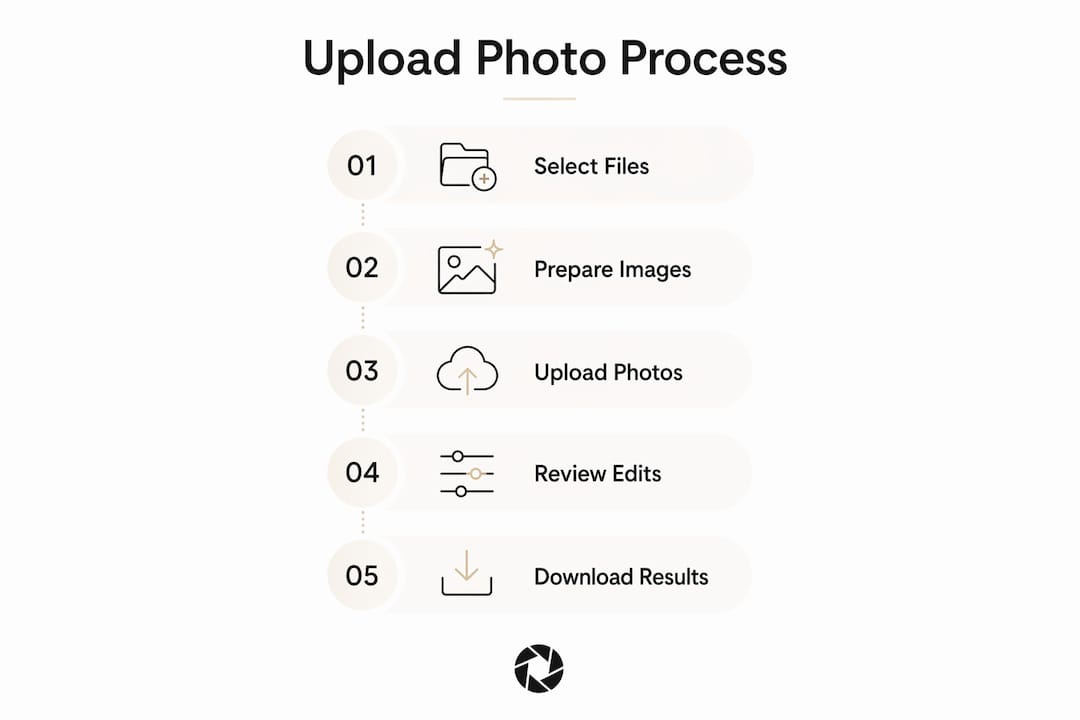
The workflow from upload to download follows a clear sequence, and knowing each step helps you set realistic expectations for turnaround and revisions.
- Upload and intake. You submit your files through the service portal. Automated checks flag obvious issues: extreme underexposure, heavy blur, or duplicate angles.
- Culling suggestions. For larger batches, the system identifies the strongest shot per room and flags redundant angles. End-to-end workflows that combine culling, batch processing, and delivery reduce manual handoffs significantly.
- Global and localized edits. Editors apply exposure and shadow balancing, white balance correction, perspective and geometry fixes, and lens corrections. Localized adjustments handle windows and highlights without blowing out the rest of the frame.
- QA review. Each image is checked for color consistency, correct perspective, and natural-looking results before delivery.
- Delivery and revisions. You receive your finished images and can request revisions within the policy. HospitalityLens includes 2 free revisions per photo on single and pack orders, and 3 free revisions on the THE OPERATOR subscription.
Typical turnaround: a single photo can be ready in as little as 15 minutes. Larger batches are generally delivered the same day. File naming, clear shot priorities, and high-quality source files all shorten the timeline.
Finished images from HospitalityLens include full commercial usage rights for Airbnb, Vrbo, Booking.com, direct-booking websites, hotel websites, real estate listings, and marketing campaigns. No separate licensing fee, no restrictions on where you publish.
Learn more about commercial usage rights before you submit your first batch.
Exactly what professional edits include — and what they do not
Professional property enhancement is a subtractive, corrective process. The goal is to show the real space accurately, not to reimagine it.
What a quality edit covers:
- Exposure and shadow balancing (lifting dark corners without washing out highlights)
- White balance and color rendering (accurate whites, warm wood tones, neutral walls)
- Perspective and horizon correction that respects architectural lines
- Localized highlight control for windows and bright surfaces
- Noise reduction for low-light or high-ISO source files
- Clutter cleanup: removing cords, personal items, and incidental objects
- People and object removal
- Lens distortion correction
The industry standard for property marketing is the “invisible edit.” Technical fixes that preserve reality rather than reinterpret it. A guest should walk into the property and recognize the photos immediately.
What professional editors do not do: add or rearrange furniture, create amenities that do not exist, apply heavy creative filters, or alter the room’s layout. AI models trained on portraiture or landscape datasets can distort interior geometry if they are not calibrated for architectural lines. A service that promises to “fix everything automatically” without examples is worth scrutinizing.
For a deeper look at what separates invisible edits from over-processed ones, the vacation rental photo editing guide covers the distinction in detail.
Pricing options: single edits, packs, and subscription
HospitalityLens pricing is transparent and scales with volume.
Current HospitalityLens pricing (USD); one-time packs — The Hero: 1 photo for $12; The Refresh: 10 photos for $59; The Property: 25 photos for $129; The Portfolio: 100 photos for $399; monthly subscriptions — THE STARTER: 10 photos/month for $49/month; THE OPERATOR: 25 photos/month for $99/month; THE PORTFOLIO: 100 photos/month for $299/month; one-time pack credits do not expire; monthly subscription credits remain valid for up to 3 months; 2 free revisions per photo on one-time packs; 3 free revisions per photo on monthly subscriptions. See current pricing.
The PRO plan includes 25 photos per month and unlimited additional photos at $3.96 each. For a property manager onboarding two to three new listings per month, that math works out quickly.
Current HospitalityLens pricing (USD); one-time packs — The Hero: 1 photo for $12; The Refresh: 10 photos for $59; The Property: 25 photos for $129; The Portfolio: 100 photos for $399; monthly subscriptions — THE STARTER: 10 photos/month for $49/month; THE OPERATOR: 25 photos/month for $99/month; THE PORTFOLIO: 100 photos/month for $299/month; one-time pack credits do not expire; monthly subscription credits remain valid for up to 3 months; 2 free revisions per photo on one-time packs; 3 free revisions per photo on monthly subscriptions. See current pricing.
- One urgent listing: start with the single-photo trial.
- A full property gallery of 20–30 shots: the 25-photo pack at $5.16/photo is the right fit.
Current HospitalityLens pricing (USD); one-time packs — The Hero: 1 photo for $12; The Refresh: 10 photos for $59; The Property: 25 photos for $129; The Portfolio: 100 photos for $399; monthly subscriptions — THE STARTER: 10 photos/month for $49/month; THE OPERATOR: 25 photos/month for $99/month; THE PORTFOLIO: 100 photos/month for $299/month; one-time pack credits do not expire; monthly subscription credits remain valid for up to 3 months; 2 free revisions per photo on one-time packs; 3 free revisions per photo on monthly subscriptions. See current pricing.
How to judge whether your edits are professional and truthful
Before you publish, run a short QA check against these standards:
- Color accuracy. Whites should look white, not blue or yellow. Wood tones should be warm, not gray. Walls should match the actual paint color.
- Exposure consistency. Pull up three or four images side by side. Brightness and shadow depth should feel matched, not random.
- Perspective. Vertical lines (door frames, walls) should be straight. Furniture should not look stretched or compressed.
- No missing or added objects. Confirm that clutter removal did not accidentally erase a fixture, and that no furniture appeared that was not in the original.
- Window handling. Outdoor views through windows should be visible and natural, not blown out to white or artificially darkened.
Pro Tip: View your finished images on both a phone screen and a laptop before publishing. Platforms like Airbnb and Booking.com compress images differently, and a subtle color shift that looks fine on a desktop can appear noticeably warm or cool on mobile. Localized adjustments hold up better across devices than global brightness boosts.
Common red flags and what to ask before you pay
Not every photo enhancement service delivers what it promises. Watch for these warning signs:
- No before-and-after examples on the website
- Claims of “perfect results for every image” with no caveats
- Unspecified or vague commercial usage rights
- No stated revisions policy
- Inconsistent color across the sample gallery (a sign of batch automation without QA)
- AI geometry corrections that stretch doorways or distort furniture shapes
Before committing to any service, ask: How many free revisions are included? Are commercial usage rights standard or an add-on? What is the typical turnaround for a 25-photo batch? If those answers are not clearly stated on the pricing page, that is itself a signal.
To avoid delays on your own end: name files by room before uploading, flag your priority shots, and send the highest-quality source file available. Unclear file names and mixed-quality uploads are the most common causes of back-and-forth that extends turnaround.
For larger hospitality teams coordinating photo updates alongside operations tasks, real-time task management tools can help keep photo refresh cycles in sync with property schedules.
Key Takeaways
Uploading your best source files to a dedicated property photo enhancement service is the fastest, most cost-effective path to booking-ready listing images without a photoshoot.
Free watermarked preview. Pay only if you like it. No card is required to create the free watermarked preview. See current pricing for unlocks, one-time packs, and subscriptions.
What the HospitalityLens team has learned from real hosting workflows
The hosts and teams who get the most from photo enhancement are not the ones with the best cameras. They are the ones who send clear, well-lit source files and trust the process to handle the technical corrections. Most of the time, the gap between a mediocre listing photo and a booking-ready one is not dramatic. It is a lifted shadow, a corrected horizon, a removed cord. Small, invisible changes that add up to a property that looks cared for.
The reason HospitalityLens focuses on truthful edits is practical, not philosophical. Guests who book based on accurate photos arrive with calibrated expectations. That reduces complaints, improves reviews, and builds the kind of trust that drives repeat bookings. A photo that overpromises costs you more in the long run than one that undersells.
Speed and consistency matter just as much as quality for teams managing multiple listings. A coherent portfolio, where every property shares the same visual standard, signals professionalism to guests before they read a single word of your description.
HospitalityLens: booking-ready photos without the photoshoot
Current HospitalityLens pricing (USD); one-time packs — The Hero: 1 photo for $12; The Refresh: 10 photos for $59; The Property: 25 photos for $129; The Portfolio: 100 photos for $399; monthly subscriptions — THE STARTER: 10 photos/month for $49/month; THE OPERATOR: 25 photos/month for $99/month; THE PORTFOLIO: 100 photos/month for $299/month; one-time pack credits do not expire; monthly subscription credits remain valid for up to 3 months; 2 free revisions per photo on one-time packs; 3 free revisions per photo on monthly subscriptions. See current pricing.

The service covers everything from a single urgent listing photo to a full portfolio refresh. Every enhanced image includes commercial usage rights for Airbnb, Vrbo, Booking.com, hotel websites, and marketing campaigns. Revisions are built into every plan: 2 free per photo on packs, 3 on the THE OPERATOR subscription.
The PRO plan at $99/month is built for teams onboarding or refreshing listings regularly. At 25 photos per month plus $3.96 for each additional image, it covers most active property managers without requiring a per-project quote every time.
Current HospitalityLens pricing (USD); one-time packs — The Hero: 1 photo for $12; The Refresh: 10 photos for $59; The Property: 25 photos for $129; The Portfolio: 100 photos for $399; monthly subscriptions — THE STARTER: 10 photos/month for $49/month; THE OPERATOR: 25 photos/month for $99/month; THE PORTFOLIO: 100 photos/month for $299/month; one-time pack credits do not expire; monthly subscription credits remain valid for up to 3 months; 2 free revisions per photo on one-time packs; 3 free revisions per photo on monthly subscriptions. See current pricing.
Useful sources and further reading
FAQ
How long does it take to get enhanced photos back?
A single photo can be ready in as little as 15 minutes. Larger batches are typically delivered the same day, depending on volume and file quality.
What file types does HospitalityLens accept?
RAW files and high-quality JPEGs are both supported. RAW is preferred because it preserves the most color and shadow detail for correction.
Are commercial usage rights included with every edit?
Yes. Every image enhanced by HospitalityLens includes commercial usage rights for listing platforms, hotel websites, and marketing campaigns at no additional cost.
How many revisions are included?
Single photos and one-time packs include 2 free revisions per image. The THE OPERATOR subscription includes 3 free revisions per photo.
What edits will not be made to my photos?
HospitalityLens does not add furniture, create amenities that do not exist, or alter a room’s layout. Every edit is corrective and truthful, preserving the real property as it appears.
Recommended