Photography Tips
How to Increase Perceived Value of Rental with Photos
Elevate your rental's appeal and boost inquiries by showcasing its best features through strategic, high-quality photography, attracting better tenants.
By Hospitality Lens · · 11 min read
TL;DR:
- Clear, professional-looking rental photos can improve how easily prospective tenants evaluate a property, but there is no universal inquiry or rent uplift. Proper preparation, honest editing, and logical sequencing create accurate and appealing listings that attract quality tenants. Regularly updating photos preserves truthful representation and maximizes rental value.
Listing photos are the first decision point for any prospective tenant or guest. Professional photos increase perceived value of a rental by signaling a well-maintained property and a professional host. The industry term for this effect is “visual merchandising,” and it applies directly to rental listings. Listings with professional photography receive up to 61% more inquiries and can command 5–10% higher rents. That gap between a dark, crooked phone snapshot and a clean, well-lit image is not just aesthetic. It is financial.
The listing photo is emotional before it is rational. A prospective tenant scrolling through Airbnb, Vrbo, or Booking.com makes a split-second judgment based on the first image. High-quality images signal a professional landlord who maintains their property, which attracts higher-quality tenants willing to pay premium rates. You do not need a photoshoot to get there. You need the right preparation, the right technique, and honest editing.
How to increase perceived value of rental with photos: what you need before you shoot
Good photos start before you pick up a camera. Preparation, lighting, composition, and capture quality all influence the final result.
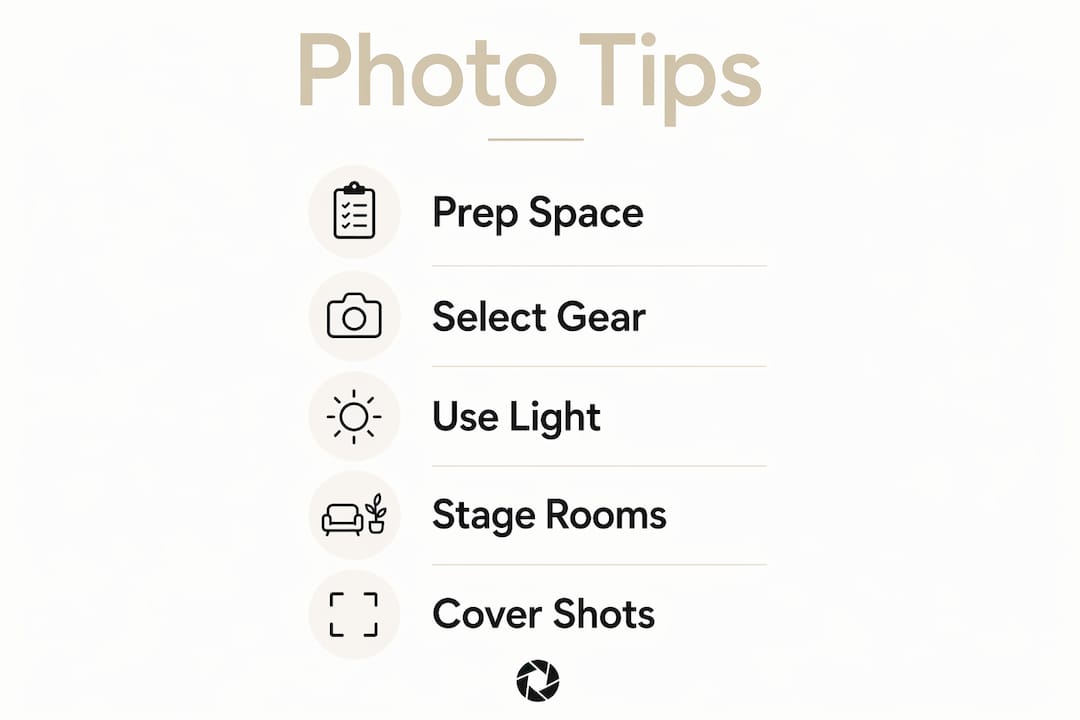
Camera and lens selection. A DSLR or mirrorless camera with a wide-angle lens (16–24mm equivalent) captures room scale accurately. Smartphones with AI-enhanced cameras are a practical alternative for managers who need fast turnaround on multiple listings. The key is resolution: images should be at least 1,920 pixels on the long edge for platform display.
Lighting setup. Natural light is your best tool. Schedule shoots on bright mornings or early afternoons when sunlight fills the space without harsh shadows. Replace any mixed bulbs (some warm, some cool) with consistent warm-white LEDs before shooting. Mixed lighting creates color casts that no amount of editing fully corrects.
Staging and declutter. Remove personal items, cleaning supplies, and anything that signals the space is not ready for a guest. Clear countertops, fold towels neatly, and pull back curtains. The goal is “clean, but not sterile.” A property that looks lived-in but tidy reads as welcoming. One that looks sterile reads as cold.
Photo coverage checklist. Every listing should include: exterior and entry, living room, kitchen, each bedroom, each bathroom, storage areas, and any unique amenity (balcony, pool, fireplace). Including key amenity shots reduces repetitive tenant inquiries and improves lead quality.
Pro Tip: Shoot the exterior first on a sunny day, even if you plan to photograph interiors on a different day. The exterior shot is often the thumbnail image on listing platforms, and it carries the most weight for click-through rates.
Step-by-step tips for capturing photos that boost rental appeal
Execution matters as much as preparation. Follow this sequence to capture images that attract tenants and support higher rents.
-
Start with the exterior. Shoot from the street or entry path at eye level. Include the full facade, any landscaping, and the front door. This sets the first impression and establishes the property’s character.
-
Move to the living areas. Position the camera at chest height or slightly above. Natural light and wide shots from this angle best convey room size and layout. Shoot from the corner of the room to capture the most depth.
-
Photograph the kitchen with purpose. Show the full counter run, appliances, and storage. If the kitchen has a standout feature like a tile backsplash or a large island, capture a close-up detail shot. Detail shots of premium finishes justify higher price points in the tenant’s mind.
-
Capture bathrooms carefully. Bathrooms are small and tricky. Use a wide-angle lens, shoot from the doorway, and make sure the mirror does not reflect the camera. Fresh white towels and an empty counter make the space look clean and hotel-ready.
-
Photograph each bedroom individually. Show the bed, the window, and the closet or storage. Tenants want to visualize sleeping and living in the space. Natural light through the window helps.
-
End with amenities and outdoor spaces. A balcony, backyard, parking space, or gym adds perceived value. Photograph these last so the sequence builds from arrival to living to extras.
-
Review and sequence your gallery. Arrange photos in a logical walkthrough order. A gallery that flows from exterior to living room to kitchen to bedrooms to bathrooms to amenities mirrors how a tenant would tour the property in person.
Pro Tip: Avoid wide-angle distortion at the edges of the frame. If walls or furniture look warped or stretched, step back from the wall and zoom in slightly rather than shooting from extreme close range.
Renters prefer straightforward, well-lit galleries that accurately represent the property over highly artistic or stylized photos. Transparency builds the trust that converts a view into a booking.

How to enhance rental listing photos without misleading viewers
Photo editing is not about making a property look better than it is. It is about removing the technical barriers that prevent a photo from showing the property as it actually looks in person.
Lighting and color correction
Smartphone cameras struggle with mixed lighting. AI enhancement corrects color temperature and shadow detail to produce bright but realistic images. In practice, this means lifting shadows in a dark corner, cooling down an orange-tinted ceiling, or balancing a room where one window is blowing out the exposure. The result looks like what your eye sees standing in the room, not what the camera captured.
Perspective and geometry correction
Wide-angle lenses distort vertical lines. A wall that leans inward or a ceiling that appears to slope makes a room look smaller than it is. Perspective correction straightens these lines so the room dimensions read accurately. This is not manipulation. It is removing a camera artifact that misrepresents the space.
Clutter and object removal
A cleaner’s cart left in frame, a cord draped across the floor, or a personal item on the nightstand all reduce perceived value. Digital removal of these distractions produces a cleaner presentation without altering the property itself.
What to avoid in editing
Over-editing or misleading manipulation reduces renter trust and increases tour no-shows. Do not add virtual furniture to an empty room and present it as furnished. Do not widen a room digitally beyond its actual dimensions. Do not saturate colors to the point where the space looks like a magazine set. Tenants who arrive expecting one property and find another do not book again.
Pro Tip: A useful test: show your edited photo to someone who has not seen the property. If they describe a feature that does not exist, the edit has gone too far.
Consistent photo quality across multiple listings builds a recognizable brand that tenants trust. Property managers running portfolios of 10 or more listings benefit most from standardized editing workflows.
Common mistakes that undermine rental photo value
Even well-intentioned photo efforts fail when these errors appear in the final gallery.
-
Outdated photos. A listing showing a couch that was replaced two years ago confuses tenants and erodes trust. Update photos after any significant furniture change, renovation, or seasonal refresh.
-
Incomplete galleries. Missing a bathroom, skipping the kitchen, or leaving out the parking area forces tenants to ask questions that a photo would have answered. Unanswered questions become reasons not to book.
-
Poor lighting choices. Shooting at dusk, with overhead fluorescent lights only, or with curtains closed produces flat, dark images. Dark images read as “something to hide” to a prospective tenant.
-
Bad angles that shrink spaces. Shooting from the center of a room rather than a corner, or pointing the camera slightly downward, makes rooms look smaller. A room that looks small in photos gets filtered out before the tenant ever reads the description.
-
Ignoring photo performance signals. If inquiries drop after a photo update, or if tenants consistently ask about a room not shown, those are data points. Monitor inquiry volume and tenant feedback as a proxy for photo effectiveness.
Pro Tip: Set a calendar reminder every six months to review your listing photos. Compare them against current market listings in your area. If your photos look dated by comparison, a refresh is overdue.
A well-lit, accurate gallery generates higher-quality leads and reduces wasted inquiries. The goal is not to attract every viewer. It is to attract the right tenant who books without hesitation.
Key Takeaways
Professional rental photos increase perceived value by signaling property quality, attracting better tenants, and supporting higher rents through accurate, well-lit, and consistently edited images.
| Point |
Details |
| Photos drive inquiries and rent |
Professional-looking photos can improve presentation, but there is no universal percentage increase in inquiries or rent. |
| Preparation determines quality |
Declutter, stage, and set consistent lighting before shooting to reduce editing work later. |
| Sequence your gallery logically |
Arrange shots in walkthrough order: exterior, living areas, kitchen, bedrooms, bathrooms, amenities. |
| Edit honestly, not aggressively |
Correct lighting and perspective without altering room dimensions or adding features that do not exist. |
| Refresh photos regularly |
Update your gallery after renovations, furniture changes, or every six months to stay competitive. |
What we have learned about photos and rental value
The HospitalityLens Team’s perspective
The most common mistake we see is treating listing photos as a one-time task. Property managers photograph a unit at launch, then leave those same images live for two or three years while the property evolves around them. The photos stop representing the property. They start representing a memory of it.
The second mistake is chasing perfection over accuracy. Hyper-stylized images with dramatic lighting and virtual staging attract clicks, but they also attract tenants who feel misled at the door. The properties that convert views to bookings most reliably are the ones where the photo and the in-person experience match. That match is what builds the five-star review.
AI photo enhancement has changed the economics of this problem. You no longer need to choose between an expensive photoshoot and a mediocre phone photo. You can take a reasonable photo with what you have, correct the lighting, fix the horizon, remove the clutter, and publish a booking-ready image the same day. The barrier is lower than it has ever been. The managers who act on that are the ones filling their calendars while others wait for the “right time” to invest in photos.
Honest representation is not a constraint on marketing. It is the marketing. The tenant who books because your photos accurately showed them what they were getting is the tenant who leaves a good review, refers friends, and books again.
— The HospitalityLens Team
Better listing photos, without booking a photoshoot
HospitalityLens turns rough, dark, or cluttered property photos into booking-ready listing images without a photoshoot. You upload what you have, and the team returns corrected images with better lighting, straightened horizons, and removed distractions, all while preserving what the property actually looks like.

The service is built for property managers handling multiple listings who need consistent, professional visuals fast. HospitalityLens offers a free watermarked preview before payment; see current pricing for the finished image, packs, subscriptions, and current revision terms. Every image includes commercial usage rights for Airbnb, Vrbo, Booking.com, and direct-booking sites. Try one photo free and see the result before you commit to anything.
FAQ
How much do professional photos increase rental inquiries?
There is no universal percentage by which professional photos increase rental inquiries or reduce lease-up time. Clear, accurate images can make a property easier to evaluate, while outcomes also depend on price, market, condition, amenities, location, and demand.
What rooms should every rental listing include in its photo gallery?
Every gallery should cover the exterior, living room, kitchen, each bedroom, each bathroom, storage areas, and any notable amenity such as a balcony, pool, or parking space.
Is AI photo editing honest enough for rental listings?
Yes, when used correctly. AI enhancement corrects lighting and perspective without altering room dimensions or adding features that do not exist, which keeps the images accurate and trustworthy.
How often should rental listing photos be updated?
Update photos after any significant renovation or furniture change, and review the full gallery at least every six months to confirm it still accurately represents the property.
Does photo quality affect tenant quality, not just inquiry volume?
High-quality images function as a trust signal that attracts tenants who expect a well-maintained property and are willing to pay for it.
Recommended